AudienceIds not working after running Add-PnPNavigationNode
Nobody has claimed this yet.
- Dominant language
- C#
- Stars
- 259
- Forks
- 161
- Avg merge
- 10h 33m
- Merged PRs (30d)
- 1
Description
Please let me know if this isn't the right place for this question/bug report. When I run the following code to add a Quick Launch link and add an audience it seems to work just fine. No errors are thrown and when I go to the SharePoint site I can see the audience associated with this guid was added to the link.
The problem is that the Quick Launch link is still visible to me even though I am not part of the audience. I was expecting the link to be hidden. Even more strange is that if I add the audience to the link using the UI on the SharePoint site it works as expected. The link is hidden from me.
Is there something I'm not doing correctly? All the websites I can find online say this code should work.
$newNode = Add-PnPNavigationNode -Location "QuickLaunch" -Title "Audience Test" -Url "http://linkless.header/"

$audienceList = New-Object System.Collections.Generic.List[guid]
$audienceList.add([System.guid]::New(("7e5c22f2-1254-453e-84f4-58ce4ed3e995")))

$newNode.AudienceIds = $audienceList
$newNode.Update()
Invoke-PnPQuery
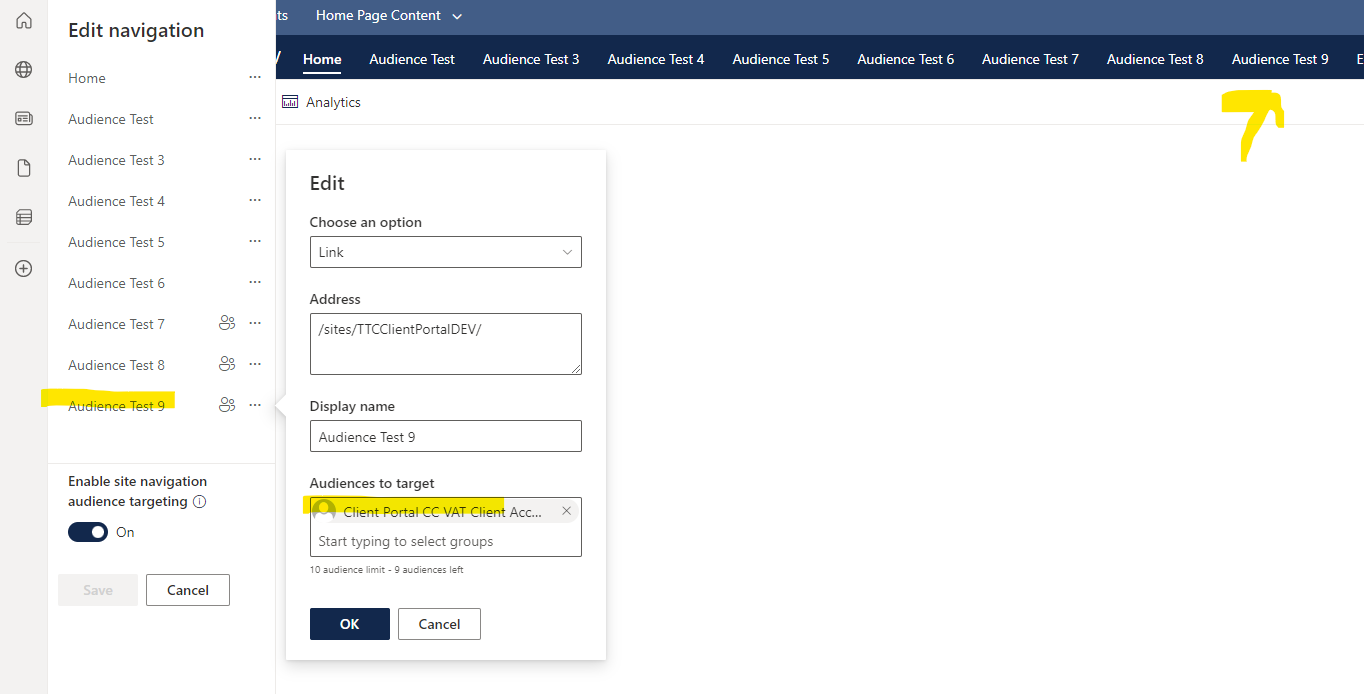
Here is a screen shot. The Audience Test 9 link should not be visible to me because I am not in that group. Even after refreshing the page it is still visible.
Contributor guide
No contributing guide indexed for this repository
First steps
- Read the whole issue, then the project's contributing guide.
- Comment on the issue to say you are picking it up — it saves two people doing the same work.
- Fork the repository and make your change on a branch.
- Open a pull request that references the issue number.
Research direction
Start by reproducing the Add-PnPNavigationNode, AudienceIds, Update, and Invoke-PnPQuery sequence against SharePoint, then compare it with a navigation node configured through the site UI. Trace the navigation-node audience handling to determine why the same audience is visible after refresh; done means the cmdlet-created link is hidden for users outside the audience.
Written by the indexing model from the issue text.
Assessment
- Tech stack
- csharp, powershell
- Domain
- api, backend
- Issue type
- Bug
- Difficulty
- 4/5
- Estimated time
- 3-5 days
- Activity status
- Stale
- Clarity
- Mostly clear
- Newbie friendliness
- 32/100