Issue with Invoke-PnPTenantTemplate command at DevOps Pipeline
Nobody has claimed this yet.
- Dominant language
- C#
- Stars
- 259
- Forks
- 161
- Avg merge
- 10h 33m
- Merged PRs (30d)
- 1
Description
Describe the issue
Applying lookbook template package file i.e. ".pnp" via DevOps pipeline execute half template activity not completely.
On the other hand, same activity i tried with SPO Management shell. it execute fine.
using PnP Powershell 1.8 version.
Template file downloaded from here https://github.com/SharePoint/sp-dev-provisioning-templates/blob/master/tenant/benefits/benefits.pnp
Used Copy task to place the file into Artifact folder. It moved like "D:\a\1\lookbooktemplatesartifacts\LookBook\Sites\Benefits\benefits.pnp"
**PowerShell used for DevOps Pipeline -> Execute Partially **
`if (-not(Get-Module -ListAvailable -Name PnP.PowerShell) ){
Install-Module -Name "PnP.PowerShell" -RequiredVersion 1.8.0 -AllowClobber -Force
}
$creds = New-Object System.Management.Automation.PSCredential -ArgumentList ("user email id", "secure string as password")
try {
    Invoke-PnPTenantTemplate -Path "<<replace with .pnp absolute file path>>"
    Get-PnPException -All
    }
    catch {
    }
template is getting store into artifact library and below is generate path is getting generated.
D:\a\1\lookbooktemplatesartifacts\LookBook\Tenant\Benefits\benefits.pnp
`
PowerShell used with SharePoint Online Management Shell - Execute Fine
$creds = Get-Credential Connect-PnPOnline -Url "https://m365x6151710-admin.sharepoint.com/" -Credentials $creds try { Invoke-PnPTenantTemplate -Path "<<replace with .pnp absolute file path>>" Get-PnPException -All } catch { }
Expected behavior
Whenever we run Invoke-PnPTenantTemplate -Path "<<replace with .pnp absolute file path>>
It should have same behavior SPO Management Shell & DevOps Pipeline. Pipeline execute partially and come out without any error.
Screenshots
If applicable, add screenshots to help explain your problem.
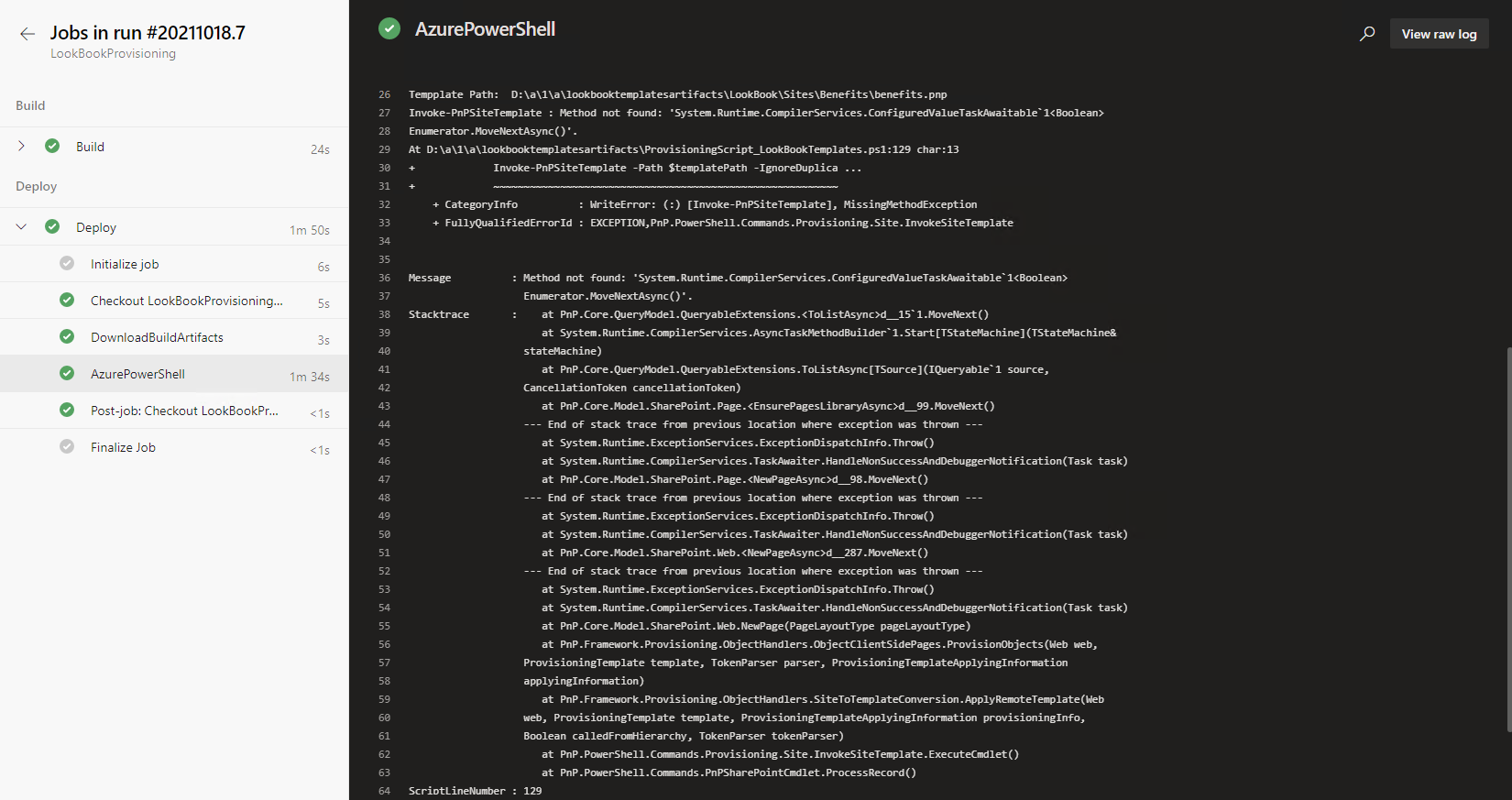
DevOps Pipeline failing with below error
Details (please complete the following information):
`
+ CategoryInfo : WriteError: (:) [Invoke-PnPSiteTemplate], MissingMethodException
+ FullyQualifiedErrorId : EXCEPTION,PnP.PowerShell.Commands.Provisioning.Site.InvokeSiteTemplate
Message : Method not found: 'System.Runtime.CompilerServices.ConfiguredValueTaskAwaitable1<Boolean>
Enumerator.MoveNextAsync()'.
Stacktrace : at PnP.Core.QueryModel.QueryableExtensions.<ToListAsync>d__151.MoveNext()
at System.Runtime.CompilerServices.AsyncTaskMethodBuilder1.Start[TStateMachine](TStateMachine&
stateMachine)
at PnP.Core.QueryModel.QueryableExtensions.ToListAsync[TSource](IQueryable1 source,
CancellationToken cancellationToken)
at PnP.Core.Model.SharePoint.Page.d__99.MoveNext()
--- End of stack trace from previous location where exception was thrown ---
at System.Runtime.ExceptionServices.ExceptionDispatchInfo.Throw()
at System.Runtime.CompilerServices.TaskAwaiter.HandleNonSuccessAndDebuggerNotification(Task task)
at PnP.Core.Model.SharePoint.Page.d__98.MoveNext()
--- End of stack trace from previous location where exception was thrown ---
at System.Runtime.ExceptionServices.ExceptionDispatchInfo.Throw()
at System.Runtime.CompilerServices.TaskAwaiter.HandleNonSuccessAndDebuggerNotification(Task task)
at PnP.Core.Model.SharePoint.Web.d__287.MoveNext()
--- End of stack trace from previous location where exception was thrown ---
at System.Runtime.ExceptionServices.ExceptionDispatchInfo.Throw()
at System.Runtime.CompilerServices.TaskAwaiter.HandleNonSuccessAndDebuggerNotification(Task task)
at PnP.Core.Model.SharePoint.Web.NewPage(PageLayoutType pageLayoutType)
at PnP.Framework.Provisioning.ObjectHandlers.ObjectClientSidePages.ProvisionObjects(Web web,
ProvisioningTemplate template, TokenParser parser, ProvisioningTemplateApplyingInformation
applyingInformation)
at PnP.Framework.Provisioning.ObjectHandlers.SiteToTemplateConversion.ApplyRemoteTemplate(Web
web, ProvisioningTemplate template, ProvisioningTemplateApplyingInformation provisioningInfo,
Boolean calledFromHierarchy, TokenParser tokenParser)
at PnP.PowerShell.Commands.Provisioning.Site.InvokeSiteTemplate.ExecuteCmdlet()
at PnP.PowerShell.Commands.PnPSharePointCmdlet.ProcessRecord()
ScriptLineNumber : 129
`
Lookbook Template : https://github.com/SharePoint/sp-dev-provisioning-templates/blob/master/tenant/benefits/benefits.pnp
Even i am facing same issue with other template also i.e. Tenant or Site Level.
Primary Language for Tenant : English
DevOps Pipeline & Power Shell Script ran with account which has Global Administrator & SPO Administrator privilege's
Contributor guide
No contributing guide indexed for this repository
First steps
- Read the whole issue, then the project's contributing guide.
- Comment on the issue to say you are picking it up — it saves two people doing the same work.
- Fork the repository and make your change on a branch.
- Open a pull request that references the issue number.
Research direction
Start with the DevOps PowerShell script and the Invoke-PnPTenantTemplate path described in the issue, then inspect the reported PnP.Core.QueryModel.QueryableExtensions.ToListAsync and Page.EnsurePagesLibraryAsync stack trace. Compare execution in the DevOps pipeline with the SharePoint Online Management Shell; done means the tenant or site template completes in the pipeline without the MissingMethodException.
Written by the indexing model from the issue text.
Assessment
- Tech stack
- csharp, powershell
- Domain
- devops, tooling
- Issue type
- Bug
- Difficulty
- 4/5
- Estimated time
- 3-5 days
- Activity status
- Stale
- Clarity
- Mostly clear
- Newbie friendliness
- 35/100