Invoke-PnPSiteTemplate doesn't retain client side page header settings
Nobody has claimed this yet.
- Dominant language
- C#
- Stars
- 259
- Forks
- 161
- Avg merge
- 10h 33m
- Merged PRs (30d)
- 1
Description
Reporting an Issue or Missing Feature
Modern Page and Page Template headers are not applied correctly upon Invoke-PnPSiteTemplate.
Expected behavior
Page is copied with the header settings retained.
Actual behavior
Page is copied with webparts and sections, however the header settings are not retained.
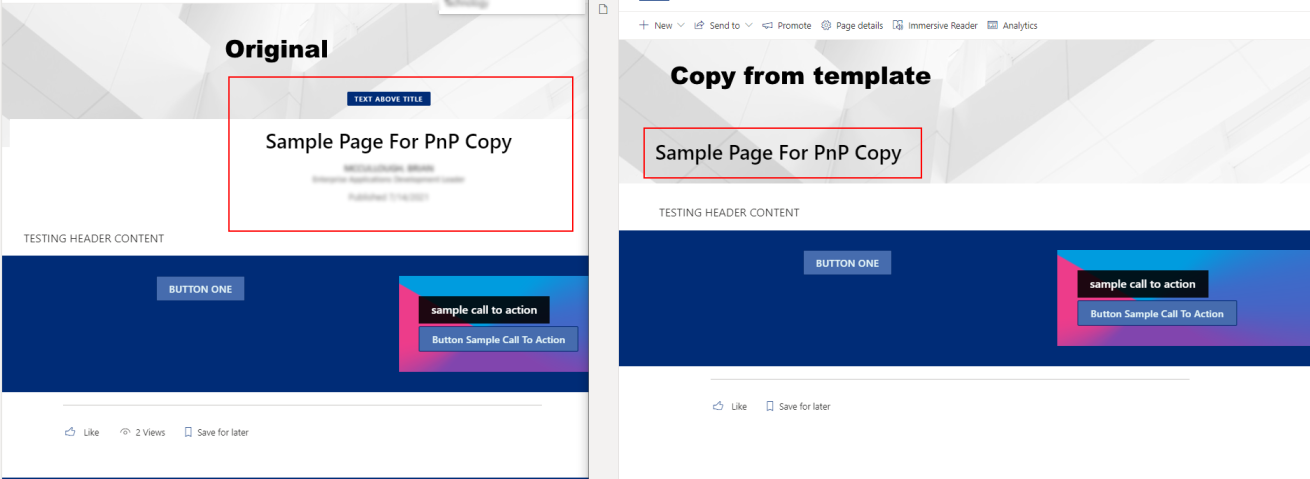
Steps to reproduce behavior
$clientId = ""
$clientSecret = ""
$sourceSiteUrl = ""
$targetSiteUrl = ""
Connect-PnPOnline $sourceSiteUrl -ClientId $clientId -ClientSecret $clientSecret
$basetemplate = Get-PnPSiteTemplate -IncludeAllClientSidePages -Handlers PageContents,Pages -OutputInstance -Schema LATEST
$template = New-PnPSiteTemplate
foreach($page in $basetemplate.ClientSidePages)
{
$page.PageName
if ($page.PageName -eq "Sample-Page-For-PnP-Copy.aspx") {
$template.ClientSidePages.Add($page)
$templatePage = $template.ClientSidePages[$template.ClientSidePages.Count - 1]
$page.Header.TextAlignment
$templatePage.Header.TextAlignment
}
<#
if($page.PromoteAsTemplate -eq $true)
{
Write-Host "^^^^^^^ TEMPLATE ^^^^^^"
    $template.ClientSidePages.Add($page)
    $templatePage = $template.ClientSidePages[$template.ClientSidePages.Count - 1]
    $page.Header.TextAlignment
    $templatePage.Header.TextAlignment
}
#>
}
<# inspect the template properties before applying and note that they are correct #>
$template.ClientSidePages[0].PageName
$template.ClientSidePages[0].Header.TextAlignment
$template.ClientSidePages[0].Header.LayoutType
$template.Files.AddRange($basetemplate.Files)
Connect-PnPOnline -Url $targetSiteUrl -ClientId $clientId -ClientSecret $clientSecret
Invoke-PnPSiteTemplate -InputInstance $template -Connection $connection -Handlers PageContents, Pages
What is the version of the Cmdlet module you are running?
1.6.0
Which operating system/environment are you running PnP PowerShell on?
- [ X] Windows
Contributor guide
No contributing guide indexed for this repository
First steps
- Read the whole issue, then the project's contributing guide.
- Comment on the issue to say you are picking it up — it saves two people doing the same work.
- Fork the repository and make your change on a branch.
- Open a pull request that references the issue number.
Research direction
Start by reproducing the issue with Get-PnPSiteTemplate and Invoke-PnPSiteTemplate using the provided PowerShell example, comparing the page Header properties before and after applying the template. Trace the Pages and PageContents handling, then verify that copied modern pages retain their header settings.
Written by the indexing model from the issue text.
Assessment
- Tech stack
- csharp, powershell
- Domain
- tooling
- Issue type
- Bug
- Difficulty
- 4/5
- Estimated time
- 3-5 days
- Activity status
- Stale
- Clarity
- Mostly clear
- Newbie friendliness
- 42/100