px.area() ignores color_discrete_sequence or color_discrete_map when mode='none'
Open
@LiamConnors is already working on this.
Since Jul 4, 2024.
bug
documentation
P3
- Dominant language
- Python
- Stars
- 18.8k
- Forks
- 2.8k
- Avg merge
- 16h 26m
- Merged PRs (30d)
- 21
Description
If I want to display just the shaded area in px.area(), without the top line, by specifying mode='none', the colors set with color_discrete_sequence or color_discrete_map are ignored. Instead, default colors of the template fig.layout.template.layout.colorway are used.
import plotly.express as px
import pandas as pd

fig = px.area(
    pd.DataFrame(
        index=[1,2,3],
        data={
            'x': [6,7,8],
            'y': [4,5,4],
        }
    ),
    color_discrete_map={
        'x': '#9467BD',
        'y': '#8C564B',
    },
)

fig.show()
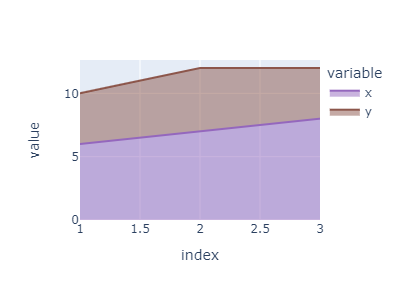
If I add
fig.update_traces(
    mode='none',
)
I get wrong colors

I would expect px.area() to preserve the colors used for shading as they appear in fig.data:
     'line': {'color': '#9467BD'},
     'mode': 'none',
     'line': {'color': '#8C564B'},
     'mode': 'none',
Without this preservation, px.area() loses functionality for color mapping with color_discrete_map.
Contributor guide
First steps
- Read the whole issue, then the project's contributing guide.
- Comment on the issue to say you are picking it up — it saves two people doing the same work.
- Fork the repository and make your change on a branch.
- Open a pull request that references the issue number.
Assessment
This issue has not been assessed yet.