Sunburst leaf opacity does not apply to black text
Nobody has claimed this yet.
- Dominant language
- JavaScript
- Stars
- 18.3k
- Forks
- 2k
- Avg merge
- 2d 12h
- Merged PRs (30d)
- 28
Description
Description of the Issue
When you change the opacity of the leaf for a sunburst trace, text that is supposed to be black (based on the background color of the sector the text belongs to), it does not get affected by the opacity.
See the codepen here: https://codepen.io/Kully/pen/QWdyvJg
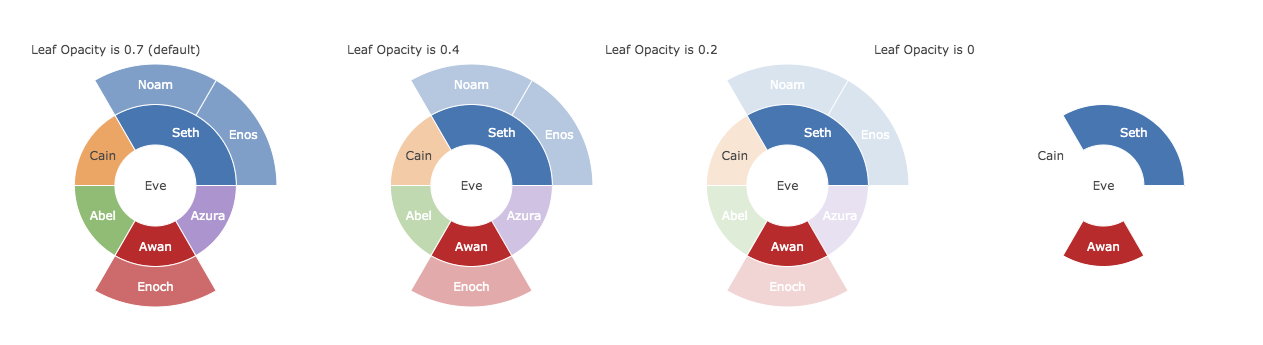
_Notice that all the text in the leaves of the chart move towards translucent as the opacity knob is turned, except for Cain.
This issue first came up in creating parity tests for the new icicle trace here #5546.
Contributor guide
First steps
- Read the whole issue, then the project's contributing guide.
- Comment on the issue to say you are picking it up — it saves two people doing the same work.
- Fork the repository and make your change on a branch.
- Open a pull request that references the issue number.
Research direction
Reproduce the behavior in the linked CodePen, focusing on the sunburst trace's leaf opacity and text-color rendering. The issue is done when black text in leaf sectors becomes translucent consistently with the other leaf labels as opacity changes, without regressing the parity case noted for the icicle trace.
Written by the indexing model from the issue text.
Assessment
- Tech stack
- javascript
- Domain
- data-visualization
- Issue type
- Bug
- Difficulty
- 3/5
- Estimated time
- 1-2 days
- Activity status
- Stale
- Clarity
- Mostly clear
- Newbie friendliness
- 35/100