Sankey Diagram hover-label opacity unaffected
Nobody has claimed this yet.
- Dominant language
- JavaScript
- Stars
- 18.3k
- Forks
- 2k
- Avg merge
- 2d 12h
- Merged PRs (30d)
- 28
Description
The opacity of the hover label cannot be changed. The alpha value is not 100 by default and there does not seem to be a working way to change it. Currently it makes the hover label difficult to interpret at times due to it’s see through nature. The options to change the colour seem unaffected by the RGBA() alpha value passed. Example of a hard to read hover label:
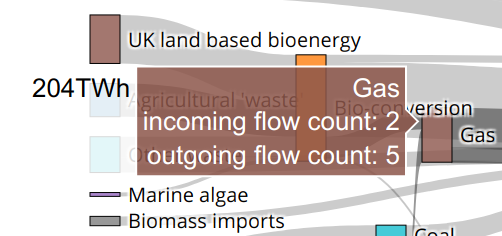
Example can be viewed here:
https://codepen.io/leviz/pen/QWjzMVa
Contributor guide
First steps
- Read the whole issue, then the project's contributing guide.
- Comment on the issue to say you are picking it up — it saves two people doing the same work.
- Fork the repository and make your change on a branch.
- Open a pull request that references the issue number.
Research direction
Start with the linked CodePen example and trace the Sankey diagram hover-label rendering in plotly.js. Confirm where the label opacity is applied and verify that the configured RGBA alpha changes the rendered label to an interpretable opacity.
Written by the indexing model from the issue text.
Assessment
- Tech stack
- javascript
- Domain
- data-visualization
- Issue type
- Bug
- Difficulty
- 3/5
- Estimated time
- 1-2 days
- Activity status
- Stale
- Clarity
- Mostly clear
- Newbie friendliness
- 35/100