Text color property does not apply to filter cell in data table
Nobody has claimed this yet.
- Dominant language
- Python
- Stars
- 24.4k
- Forks
- 2.3k
- Avg merge
- 2d 7h
- Merged PRs (30d)
- 13
Description
Describe your context
Please provide us your environment, so we can easily reproduce the issue.
- replace the result of
pip list | grep dashbelow
dash 2.0.0
-
if frontend related, tell us your Browser, Version and OS
- OS: Windows 11
- Browser: Microsoft Edge
- Version: 97
Describe the bug
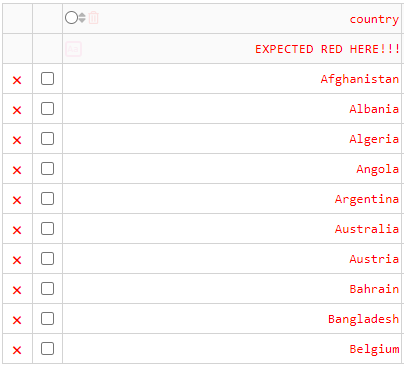
When styling filter cells, the CSS property “color” does not apply. Basically, setting style_cell={"color": "red"} or style_filter={"color": "red"} doesn’t change the filter text color.
Expected behavior
Filter cell text color should be red (or any color applied), instead, filter cell text color doesn't change.
Screenshots
If applicable, add screenshots or screen recording to help explain your problem.
Result:

Expectation:
Contributor guide
First steps
- Read the whole issue, then the project's contributing guide.
- Comment on the issue to say you are picking it up — it saves two people doing the same work.
- Fork the repository and make your change on a branch.
- Open a pull request that references the issue number.
Research direction
Start by reproducing the issue with Dash 2.0.0 using style_cell={"color": "red"} and style_filter={"color": "red"} on a data table. Inspect the filter cell styling behavior in the frontend and verify that the applied color changes the filter text as expected in Edge.
Written by the indexing model from the issue text.
Assessment
- Tech stack
- css, python, react
- Domain
- data-visualization, frontend
- Issue type
- Bug
- Difficulty
- 3/5
- Estimated time
- 1-2 days
- Activity status
- Stale
- Clarity
- Mostly clear
- Newbie friendliness
- 45/100