playcanvas / playcanvas/engine
PlayCanvas graphics appear blurry for certain browser window sizes
Nobody has claimed this yet.
- Dominant language
- JavaScript
- Stars
- 16.8k
- Forks
- 2k
- Avg merge
- 4h 32m
- Merged PRs (30d)
- 222
Description
Description
Whenever the browser window's parent rect has a width or height that's not a whole number, PlayCanvas' graphics along that axis appear blurry.
This is a screenshot of a grid of 2x2px squares enlarged in Photoshop:
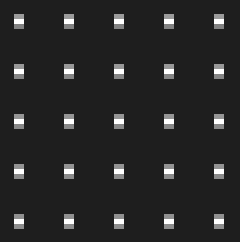
DETAILS:
"app.graphicsDevice.canvas.parentElement.getBoundingClientRect();" width and height of the rect sometimes report decimals.
Whenever that's the case, the graphics in the middle of the screen are smeared out.
When the rect width and height are whole numbers, the graphics are perfectly crisp.
The screenshot above is obviously zoomed in, but the effect is especially visible on UI text even without any zooming.
The problem has been recreated on Chrome, Firefox, Edge and Brave on a PC with a 1920x1080 monitor.
One theory that seemed promising, but ultimately didn't hold water:
If you take a screenshot and measure the actual pixel size of the browser window in Photoshop, there's usually a 1 pixel difference compared to the canvas size. This would explain the blur. However, sometimes the size of the browser window and the canvas is the same, but the graphics are still smeared if the rect size has decimals.
Steps to Reproduce
Here's a test project:
https://playcanv.as/p/jQgZcYt6/ (Build)
https://playcanvas.com/editor/project/1067189
- Resize the browser window until the rect dimensions show decimals
- Take a screenshot
- Import to Photoshop or another image editor that lets you look at individual pixels without smoothing the image when zooming
- The pixel grid will be smeared in the center of the screenshot along the axis that's not a whole number. The pixel grid will always be crisp along the edges.
Contributor guide
First steps
- Read the whole issue, then the project's contributing guide.
- Comment on the issue to say you are picking it up — it saves two people doing the same work.
- Fork the repository and make your change on a branch.
- Open a pull request that references the issue number.
Research direction
Start with the linked test project and inspect canvas sizing around app.graphicsDevice.canvas.parentElement.getBoundingClientRect(); reproduce the blur with fractional width or height in the listed browsers. No source file or test is named, so trace the graphics-device and canvas-size handling from that entry point. Done means graphics remain crisp along axes with fractional parent dimensions.
Written by the indexing model from the issue text.
Assessment
- Tech stack
- javascript
- Domain
- computer-graphics, web-dev
- Issue type
- Bug
- Difficulty
- 4/5
- Estimated time
- 3-5 days
- Activity status
- Stale
- Clarity
- Mostly clear
- Newbie friendliness
- 38/100