playcanvas / playcanvas/engine
Inconsistent Physics Mesh Collider behaviour on negative scales
Nobody has claimed this yet.
- Dominant language
- JavaScript
- Stars
- 16.8k
- Forks
- 2k
- Avg merge
- 4h 32m
- Merged PRs (30d)
- 222
Description
Description
Collision components of type mesh do not follow the behaviour of the render component in handling negative scale values. From the gif below, positive scales work fine, but negative scale values are not handled properly, as if only their absolute value is used.
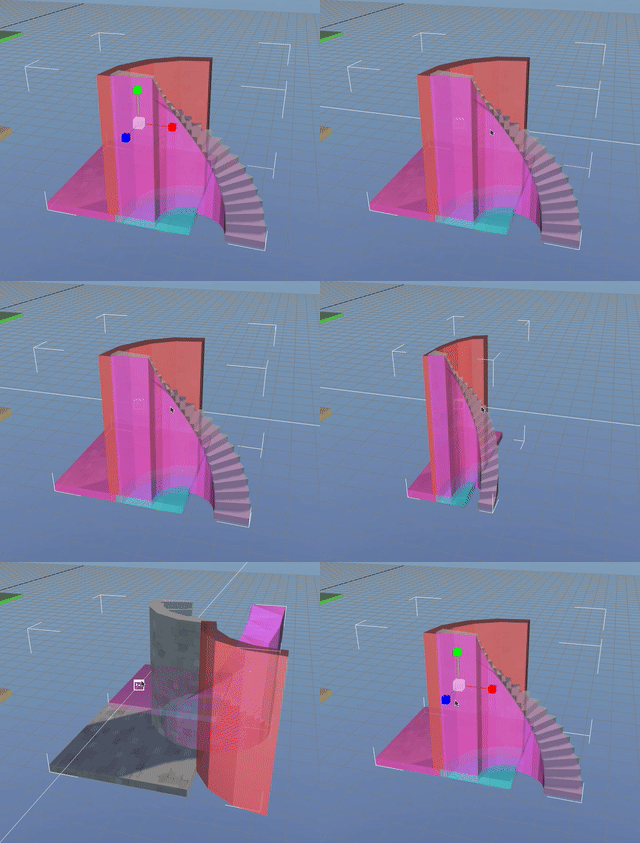
To be clear, this is not only the pre-visualisation, and the actual physics behaviour when playing is wrong.
Steps to Reproduce
- Make sure project has
Ammoimported, for physics - Create a new entity with a
collisioncomponent, set tomeshtype - Attach any render asset
- Change the scale values of the entity (
x,yorz) to negative values
Contributor guide
First steps
- Read the whole issue, then the project's contributing guide.
- Comment on the issue to say you are picking it up — it saves two people doing the same work.
- Fork the repository and make your change on a branch.
- Open a pull request that references the issue number.
Research direction
Start by locating the mesh collision component's handling of entity scale and compare it with the render component's negative-scale behavior. Reproduce the issue with Ammo using the listed entity, collision, render asset, and negative scale steps; done means the physics behavior matches the render behavior for negative x, y, and z scales.
Written by the indexing model from the issue text.
Assessment
- Tech stack
- javascript
- Domain
- game-dev
- Issue type
- Bug
- Difficulty
- 4/5
- Estimated time
- 3-5 days
- Activity status
- Stale
- Clarity
- Mostly clear
- Newbie friendliness
- 35/100