playcanvas / playcanvas/engine
Have both Auto Fit Width and Auto Width available in Text Elements to easily align elements to text
Nobody has claimed this yet.
- Dominant language
- JavaScript
- Stars
- 16.8k
- Forks
- 2k
- Avg merge
- 4h 32m
- Merged PRs (30d)
- 222
Description
To be able to align an Element to the text (eg at the end of the text) and also constrain the max width that the Element expand to.
This is not possible at the moment as Auto Width has no max constraint and Auto Fit Width has a fixed width which means the aligned Element is not next to the rendered text.
Eg. Auto Width allows us to place an element at the end of the rendered text:
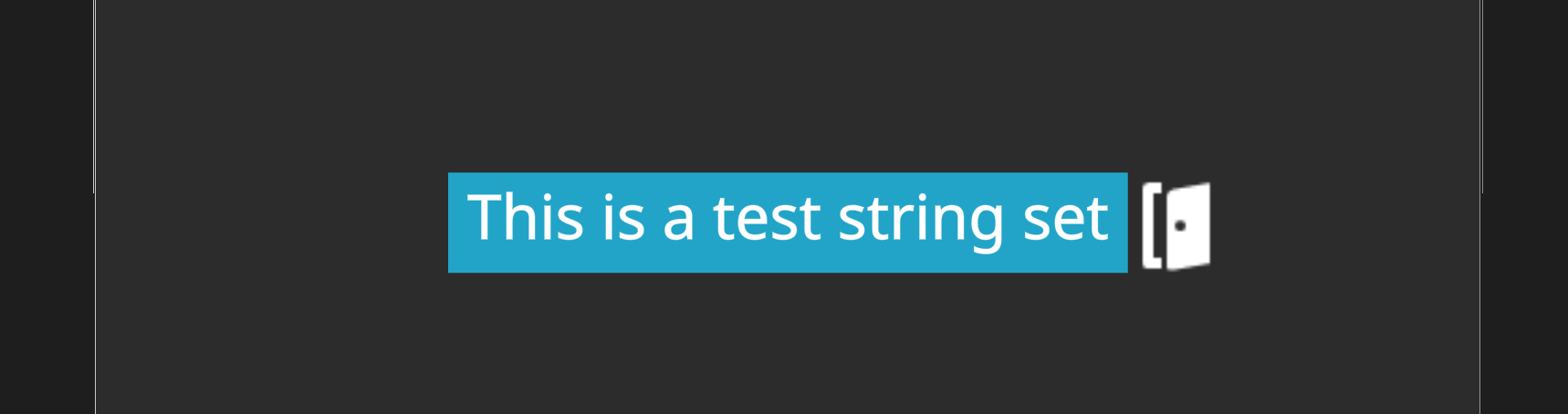
However, if the text is too long, it goes outside the bounds of the screen:

Using Auto Fit Width fixes the bounds issue but sets the text element at a fixed width so the icon is no longer next to the text:

What we would like to be able to do is to be able to shrink the text elements size to the smallest possible (like Auto Width) and also have a max constraint like Auto Fit Width. Maybe we should a min/max width property?
Contributor guide
First steps
- Read the whole issue, then the project's contributing guide.
- Comment on the issue to say you are picking it up — it saves two people doing the same work.
- Fork the repository and make your change on a branch.
- Open a pull request that references the issue number.
Research direction
Start by locating the Text Elements implementation and the existing Auto Width and Auto Fit Width entry points. Define how a text element can shrink to its rendered text while respecting a maximum width, then verify that aligned elements stay beside short text and remain within bounds for long text.
Written by the indexing model from the issue text.
Assessment
- Tech stack
- javascript
- Domain
- game-dev
- Issue type
- Feature
- Difficulty
- 4/5
- Estimated time
- 3-5 days
- Activity status
- Stale
- Clarity
- Mostly clear
- Newbie friendliness
- 35/100