playcanvas / playcanvas/editor
Make the UX on the Builds panel easier to use and not misclick
Nobody has claimed this yet.
- Dominant language
- TypeScript
- Stars
- 1.3k
- Forks
- 215
- Avg merge
- 1d 29m
- Merged PRs (30d)
- 30
Description
Forum thread: https://forum.playcanvas.com/t/ui-build-window-modification/22519
I got a suggestion for a future UI update :slight_smile:
I don’t know if others have the same “problem”, but while my build is being published, I like to delete some of the previous ones.
But if I’m hovering the “delete” option, and the publish ends, the menu disappears and I end up clicking on a build, which launch it !
It’s not really important but maybe if the play/launch function was called with a button or another menu option (see below) instead of the whole row, that would be nice 🤟
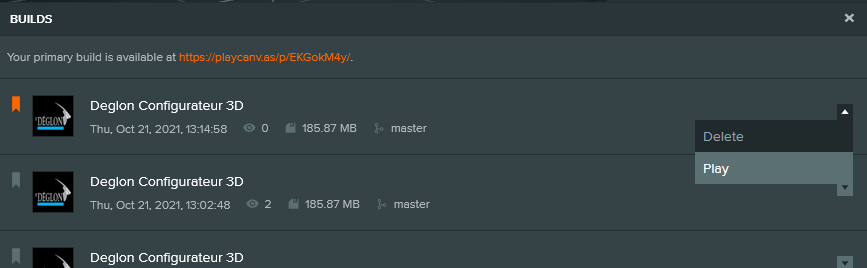
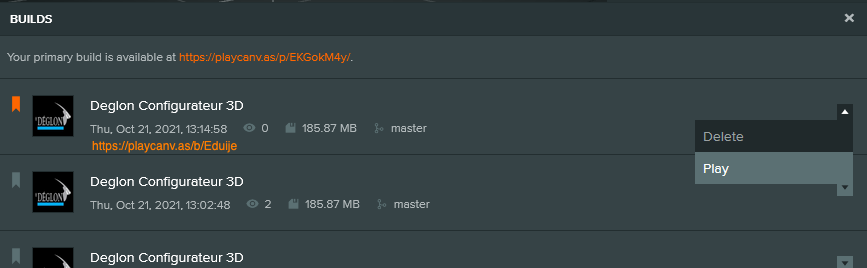
From a personal viewpoint, it's not clear that these builds have unique URLs as well.
I'm wondering if we should make the links visible on the UI and have them be clickable rather than the whole button?
eg
Contributor guide
First steps
- Read the whole issue, then the project's contributing guide.
- Comment on the issue to say you are picking it up — it saves two people doing the same work.
- Fork the repository and make your change on a branch.
- Open a pull request that references the issue number.
Research direction
Start with the Builds panel UI and review the linked forum thread for the proposed interaction changes. Inspect how publishing, deletion menus, row activation, and build URLs currently behave; done means the interaction no longer causes accidental launches and the intended build links or actions are clear and usable.
Written by the indexing model from the issue text.
Assessment
- Tech stack
- typescript
- Domain
- frontend, web-dev
- Issue type
- Feature
- Difficulty
- 4/5
- Estimated time
- 3-5 days
- Activity status
- Stale
- Clarity
- Mostly clear
- Newbie friendliness
- 30/100