playcanvas / playcanvas/editor
Toggle for Showing a Loading Screen
Open
Nobody has claimed this yet.
area: ui
enhancement
- Dominant language
- TypeScript
- Stars
- 1.3k
- Forks
- 215
- Avg merge
- 1d 29m
- Merged PRs (30d)
- 30
Description
Description
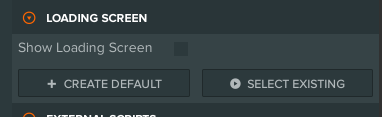
A toggle in the Settings > Loading Screen section to just not have a loading screen at all. This can also be accomplished by creating an empty javascript file, but it would be nice if there was a toggle for this.
Current Solution
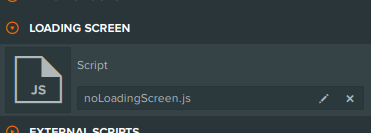
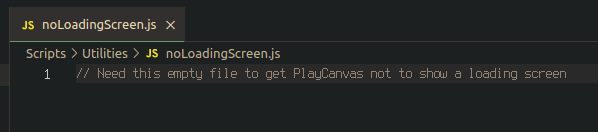
Feature Request
Contributor guide
First steps
- Read the whole issue, then the project's contributing guide.
- Comment on the issue to say you are picking it up — it saves two people doing the same work.
- Fork the repository and make your change on a branch.
- Open a pull request that references the issue number.
Research direction
Start in the Settings > Loading Screen section described in the issue and trace how its current JavaScript-file setting controls the loading screen. Add a toggle that disables the loading screen without requiring an empty JavaScript file, and verify that the setting behaves as shown in the requested design.
Written by the indexing model from the issue text.
Assessment
- Tech stack
- typescript
- Domain
- frontend
- Issue type
- Feature
- Difficulty
- 3/5
- Estimated time
- 1-2 days
- Activity status
- Stale
- Clarity
- Mostly clear
- Newbie friendliness
- 48/100