playcanvas / playcanvas/editor
Show Uncompressed VRAM Size outside Legacy Compression UI
Nobody has claimed this yet.
- Dominant language
- TypeScript
- Stars
- 1.3k
- Forks
- 215
- Avg merge
- 1d 29m
- Merged PRs (30d)
- 30
Description
Description
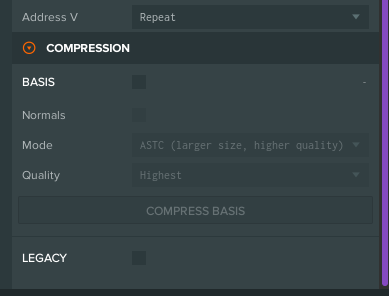
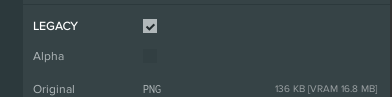
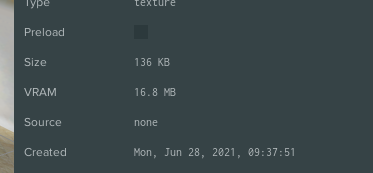
With Legacy 3D Compression, the uncompressed VRAM size is shown. I found this very helpful. After switching to Basis compression, I don't see that stat anymore. If I re-enable Legacy Compression, I can see the uncompressed VRAM again. It just feels a little weird having to enable Legacy Compression just to see that stat. I have a couple textures that are better off not compressed at all, so seeing that VRAM information helps inform my decision whether to use Basis compression.
How it currently looks
How Basis untoggled currently looks (No uncompressed VRAM info visible)
Toggling legacy compression - shows uncompressed VRAM
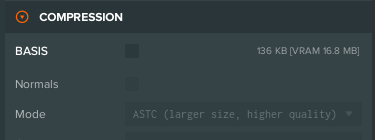
How it could look
How Basis untoggled could look like:
Alternative - Show VRAM with asset size:
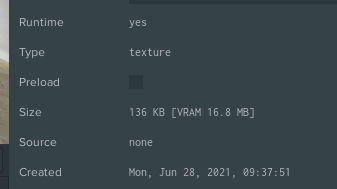
or
Contributor guide
First steps
- Read the whole issue, then the project's contributing guide.
- Comment on the issue to say you are picking it up — it saves two people doing the same work.
- Fork the repository and make your change on a branch.
- Open a pull request that references the issue number.
Research direction
Start by locating the Legacy Compression UI and the Basis compression controls that currently display uncompressed VRAM only when legacy compression is enabled. Review how the existing VRAM statistic is shown, then make it available with Basis compression and verify that the value is visible without enabling Legacy Compression.
Written by the indexing model from the issue text.
Assessment
- Tech stack
- typescript
- Domain
- frontend
- Issue type
- Feature
- Difficulty
- 3/5
- Estimated time
- 1-2 days
- Activity status
- Stale
- Clarity
- Mostly clear
- Newbie friendliness
- 45/100