playcanvas / playcanvas/editor
Drag element on input fields is preventing double click field selection
Nobody has claimed this yet.
- Dominant language
- TypeScript
- Stars
- 1.3k
- Forks
- 215
- Avg merge
- 1d 29m
- Merged PRs (30d)
- 30
Description
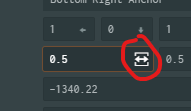
Clicking on the drag element, the pointer locks the mouse cursor.
Attempting to double click on an input field to select its content, often leads to misclicks on drag, and modifies value as the mouse is moved. Basically: the user wants to select field content, but often ends up clicking on the drag icon.
This is highly annoying.
Possible solutions:
- Get rid of the drag icon, and implement dragging only when a user mouse down on the element and moves at least a certain distance from the initial mouse event, to enable dragging state.
- Show drag icon only when shift or other hotkey is held.
- Double click to select field content, and avoid pointer lock. Just like you would double click on an input field.
Contributor guide
First steps
- Read the whole issue, then the project's contributing guide.
- Comment on the issue to say you are picking it up — it saves two people doing the same work.
- Fork the repository and make your change on a branch.
- Open a pull request that references the issue number.
Research direction
The issue does not name a file or test; first reproduce the problem in an editor input field and trace the drag element's pointer-lock and double-click handling. Done means double-clicking selects the input content without activating drag or changing the value when the mouse moves.
Written by the indexing model from the issue text.
Assessment
- Tech stack
- typescript
- Domain
- frontend
- Issue type
- Bug
- Difficulty
- 3/5
- Estimated time
- 1-2 days
- Activity status
- Stale
- Clarity
- Mostly clear
- Newbie friendliness
- 35/100