playcanvas / playcanvas/editor
Filter merge changes by type/file extension
Nobody has claimed this yet.
- Dominant language
- TypeScript
- Stars
- 1.3k
- Forks
- 215
- Avg merge
- 1d 29m
- Merged PRs (30d)
- 30
Description
We are working on our current project as a pretty big team right now and we are using the version control system of playcanvas quite extensively. We try to properly do merge/pull requests internally, but the current display of all the changes is not very friendly for this kind of workflow. Whenever we try to merge 2 branches, we get a huge list of changes, when all we would like to see are the script files for example.
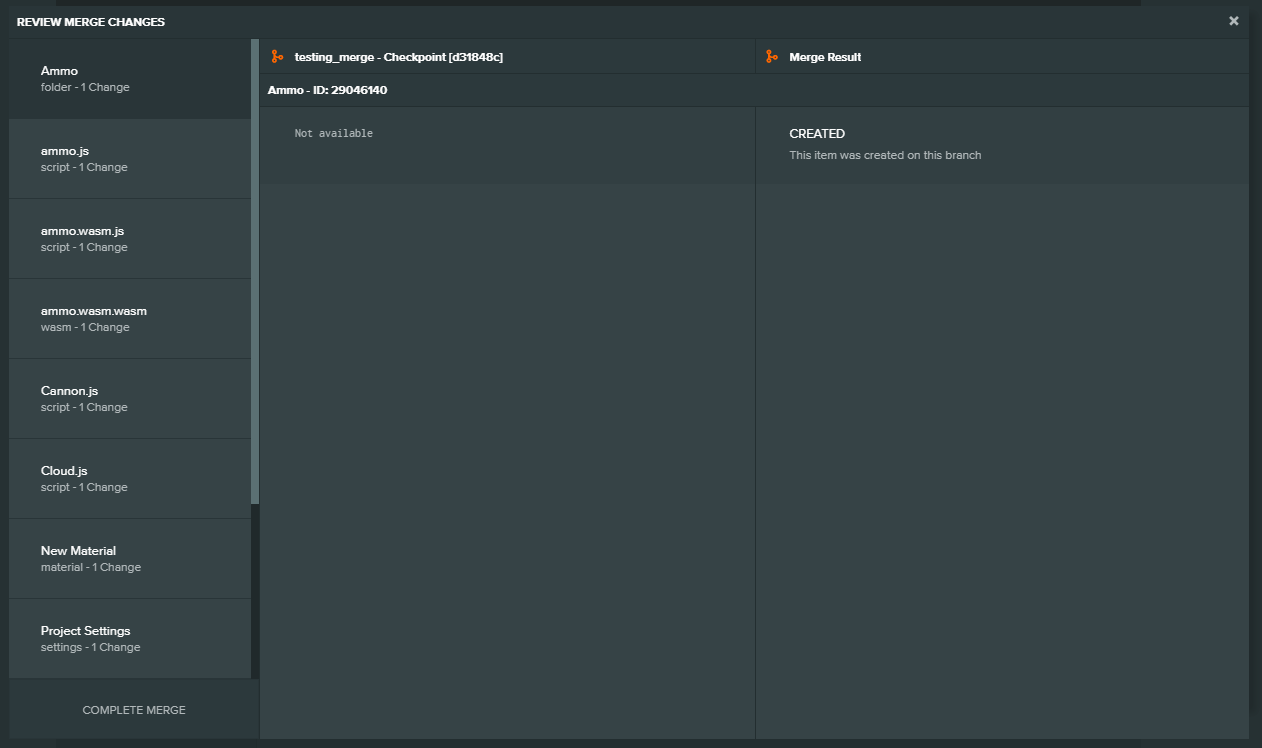
Here on the left side I would like to only see all files with the *.js extension. It would be nice to be able to filter the list, maybe by it’s file extensions, maybe by a searchfield with pattern matching of asset names. This would make our life a lot easier.
I guess it's pretty easy to create this state, but just in case: Project
- switch to branch "testing_merge"
- merge "master" into "testing_merge"
- see the list
Contributor guide
First steps
- Read the whole issue, then the project's contributing guide.
- Comment on the issue to say you are picking it up — it saves two people doing the same work.
- Fork the repository and make your change on a branch.
- Open a pull request that references the issue number.
Research direction
Start in the editor's merge view by switching to "testing_merge" and merging "master" as described in the issue, then inspect how the current change list is assembled. Done means the list can be narrowed to a file extension such as *.js and supports the requested asset-name pattern filtering.
Written by the indexing model from the issue text.
Assessment
- Tech stack
- typescript
- Domain
- frontend
- Issue type
- Feature
- Difficulty
- 4/5
- Estimated time
- 3-5 days
- Activity status
- Stale
- Clarity
- Mostly clear
- Newbie friendliness
- 38/100