[Bug]: Hover-only "Discard draft" X in the sidebar deletes the draft on one click, no confirmation or undo
Nobody has claimed this yet.
- Dominant language
- TypeScript
- Stars
- 23k
- Forks
- 5.9k
- Avg merge
- 11h 14m
- Merged PRs (30d)
- 357
Description
Area
apps/web (sidebar, shared with the desktop app)
Summary
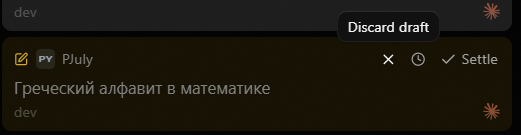
Each thread row with an unsent draft shows an X ("Discard draft") on hover, at the right edge next to Snooze and Settle. One click on it deletes the draft text and attachments. There is no confirmation, no undo, no toast. The X only appears on hover, so the first time you learn it exists is when your message is gone. I have lost drafts to it several times already.
Steps to reproduce
- Open a thread, type a message in the composer, do not send.
- Open another thread. The first row now shows the amber draft marker.
- Move the pointer onto the first row to go back to it. The hover strip at the right edge shows X, Snooze and Settle over the time/status label.
- Click while the pointer is on the X.
Expected behavior
A destructive action on user text needs a guard: a confirmation before, or an undo (toast) after. Alternatively the X should not sit inside the row's own click target, so a click meant to open the thread cannot delete its draft.
Actual behavior
The draft is cleared at once and the row loses its marker. Nothing brings the text back. The standalone new-thread draft rows above the pinned block have the same X with the same result.
Hover state right before the click. The X sits where the pointer lands when going back to the thread:
Source
Checked at main @ 7445aa733.
- Thread row: X is rendered only on hover, inside the row, next to Snooze/Settle: https://github.com/pingdotgg/t3code/blob/7445aa733ada33e45289e5aa5055f79142556513/apps/web/src/components/Sidebar.tsx#L1860-L1888
- Its handler releases uploads and clears the composer, nothing else: https://github.com/pingdotgg/t3code/blob/7445aa733ada33e45289e5aa5055f79142556513/apps/web/src/components/Sidebar.tsx#L1076-L1084
- New-thread draft row: same X, calls
clearDraftThread: https://github.com/pingdotgg/t3code/blob/7445aa733ada33e45289e5aa5055f79142556513/apps/web/src/components/Sidebar.tsx#L790-L803 and https://github.com/pingdotgg/t3code/blob/7445aa733ada33e45289e5aa5055f79142556513/apps/web/src/components/Sidebar.tsx#L897-L906 - Introduced in #9658 (thread rows) and #5777 (draft rows).
docs/user/thread-sidebar.mddoes not mention the control.
Relation to existing issues
- Discussion #10349 (Ideas, 2026-09-06) reports the same loss and asks for removal or a confirmation. No response so far. Filing as a bug because the outcome is silent loss of typed text, the same class as #12569 (accepted) and #8963, not a feature proposal.
Impact
Major degradation or frequent failure
Version or commit
Desktop 0.0.42, source checked at main @ 7445aa733
Environment
Windows 11 Home 10.0.26200, T3 Code desktop (Alpha), provider Claude Code
Workaround
None after the click. Prevention only: click the left part of the row, or copy the text before leaving the thread.
lovely composed in pair with Claude Fable 5.1 in Claude Code
Contributor guide
First steps
- Read the whole issue, then the project's contributing guide.
- Comment on the issue to say you are picking it up — it saves two people doing the same work.
- Fork the repository and make your change on a branch.
- Open a pull request that references the issue number.
Research direction
Start in apps/web/src/components/Sidebar.tsx at the thread-row hover controls and the discard handlers around the referenced lines; reproduce the click with both thread and standalone draft rows. Review how the row click, upload release, composer clearing, and clearDraftThread paths interact. Done means discarding a draft cannot silently lose its text or attachments, with either confirmation or undo behavior while preserving intended row navigation.
Written by the indexing model from the issue text.
Assessment
- Tech stack
- typescript
- Domain
- desktop, frontend
- Issue type
- Bug
- Difficulty
- 3/5
- Estimated time
- 1-2 days
- Activity status
- Active
- Clarity
- Mostly clear
- Newbie friendliness
- 68/100