TiFlash consumes lots of memory when restart
Nobody has claimed this yet.
- Dominant language
- C++
- Stars
- 1k
- Forks
- 423
- Avg merge
- 1d 15h
- Merged PRs (30d)
- 24
Description
Bug Report
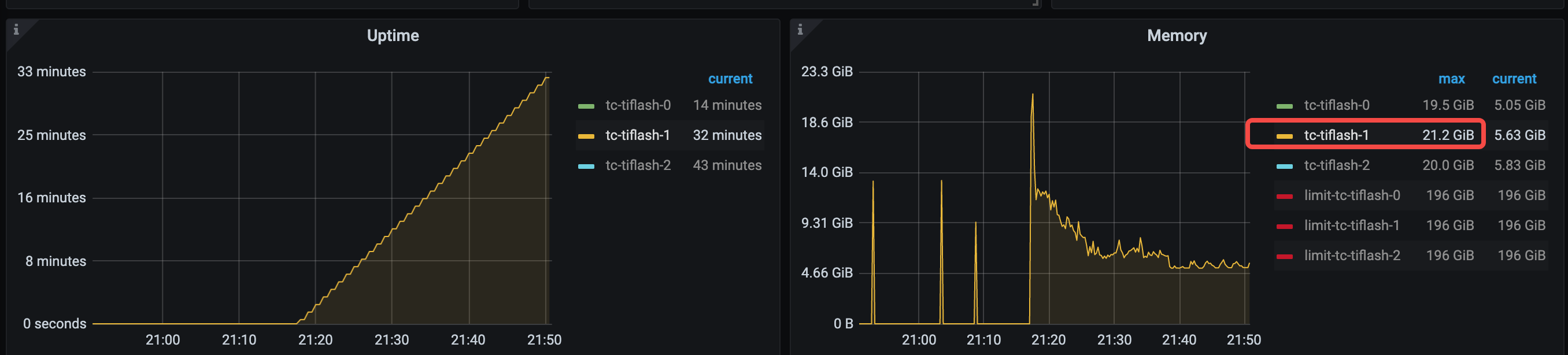
TiFlash process can't restart successfully in the k8s env that memory resource of tiflash node limit is 16GB , and the TiFlash pod status is always CrashLoopBackOff. We found the process is always killed by oom killer when starting the tiflash, and after increase the memory resource limit of tiflash, the Tiflash process start successfully. the memory usage of tiflash is large than 20GB when starting.
This would be bad in cloud due to the limited resource, Maybe we should reduce the memory usage of tiflash starting.
Please answer these questions before submitting your issue. Thanks!
1. Minimal reproduce step (Required)
2. What did you expect to see? (Required)
3. What did you see instead (Required)
4. What is your TiFlash version? (Required)
Contributor guide
No contributing guide indexed for this repository
First steps
- Read the whole issue, then the project's contributing guide.
- Comment on the issue to say you are picking it up — it saves two people doing the same work.
- Fork the repository and make your change on a branch.
- Open a pull request that references the issue number.
Research direction
No source files, tests, reproduction steps, expected behavior, or TiFlash version are provided. Start by investigating TiFlash startup in the Kubernetes environment and the reported OOM usage above 20 GB; done means the process can restart within the 16 GB limit without entering CrashLoopBackOff.
Written by the indexing model from the issue text.
Assessment
- Tech stack
- kubernetes
- Domain
- databases, infrastructure, performance
- Issue type
- Bug
- Difficulty
- 5/5
- Estimated time
- Over a week
- Activity status
- Stale
- Clarity
- Needs clarification
- Newbie friendliness
- 18/100