phpmyadmin / phpmyadmin/phpmyadmin
phpmyadmin is no longer letting me set auto_increment value and VIEW
@williamdes is already working on this.
Since Oct 5, 2020.
- Dominant language
- PHP
- Stars
- 7.9k
- Forks
- 3.6k
- Avg merge
- 4d 18h
- Merged PRs (30d)
- 36
Description
Describe the bug
phpmyadmin does not allow updating auto_increment, visually it says to have executed correctly.
To Reproduce
i have this initial structure Like this:
DROP TABLE IF EXISTS `Tbl_Lis_Agencias`;
CREATE TABLE IF NOT EXISTS `Tbl_Lis_Agencias` (
  `IdAgency` int(3) UNSIGNED ZEROFILL NOT NULL AUTO_INCREMENT,
  `AgencyCodU` int(3) UNSIGNED ZEROFILL NOT NULL DEFAULT '000',
  `AgencyName` varchar(40) CHARACTER SET utf8mb4 COLLATE utf8mb4_unicode_ci DEFAULT NULL,
  `Agency_Order` int UNSIGNED DEFAULT NULL,
  `AgencyStatus` int UNSIGNED NOT NULL DEFAULT '1',
  PRIMARY KEY (`IdAgency`),
  UNIQUE KEY `IdAgency` (`IdAgency`),
  UNIQUE KEY `Agency_Order` (`Agency_Order`),
  UNIQUE KEY `AgencyName` (`AgencyName`),
  KEY `xAgencyStatus` (`AgencyStatus`)
) ENGINE=InnoDB AUTO_INCREMENT=12345 DEFAULT CHARSET=utf8mb4 COLLATE=utf8mb4_unicode_ci;

INSERT INTO `Tbl_Lis_Agencias` VALUES
(001, 001, 'Panama', 1, 1),
(002, 020, 'Aguadulce', 2, 1),
(003, 080, 'David', 3, 1),
(004, 010, 'Vacamonte', 4, 1),
(005, 000, 'Prueba', 5, 1);
take care and check that AUTO_INCREMENT=12345 have set the value to 12345 for this example.
1. Then go to phpmyadmin to the operation tab to change the auto_increment;
you would see this:

2. need edit it to this, to try get the last auto_increment value:

3. when run you get, succefull:
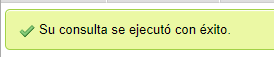
4. but when you return to the tab to view get this again:

5. if i try to insert a registry:

6. auto_increment is working but re-join to operation tab to view the property:

Why at point 4 the update of the auto_increment could not be seen? It wasn't until after a record was made at point 5 that it really became apparent ...
Configuration file: config.inc.php
<?php
/* vim: set expandtab sw=4 ts=4 sts=4: */
/**
 * phpMyAdmin sample configuration, you can use it as base for
 * manual configuration. For easier setup you can use setup/
 *
 * All directives are explained in documentation in the doc/ folder
 * or at <https://docs.phpmyadmin.net/>.
 *
 * @package PhpMyAdmin
 */
declare(strict_types=1);

/**
 * This is needed for cookie based authentication to encrypt password in
 * cookie. Needs to be 32 chars long.
 */
$cfg['blowfish_secret'] = '1465beta1qazxsw2avipacincltd2020'; /* YOU MUST FILL IN THIS FOR COOKIE AUTH! */

/**
 * Servers configuration
 */
$i = 0;

/**
 * First server
 */
$i++;
/* Authentication type */
$cfg['Servers'][$i]['auth_type'] = 'cookie';
/* Server parameters */
$cfg['Servers'][$i]['host'] = 'localhost';
$cfg['Servers'][$i]['compress'] = false;
$cfg['Servers'][$i]['AllowNoPassword'] = false;

/**
 * phpMyAdmin configuration storage settings.
 */

/* User used to manipulate with storage */
// $cfg['Servers'][$i]['controlhost'] = '';
// $cfg['Servers'][$i]['controlport'] = '';
// $cfg['Servers'][$i]['controluser'] = 'pma';
// $cfg['Servers'][$i]['controlpass'] = 'pmapass';

/* Storage database and tables */
// $cfg['Servers'][$i]['pmadb'] = 'phpmyadmin';
// $cfg['Servers'][$i]['bookmarktable'] = 'pma__bookmark';
// $cfg['Servers'][$i]['relation'] = 'pma__relation';
// $cfg['Servers'][$i]['table_info'] = 'pma__table_info';
// $cfg['Servers'][$i]['table_coords'] = 'pma__table_coords';
// $cfg['Servers'][$i]['pdf_pages'] = 'pma__pdf_pages';
// $cfg['Servers'][$i]['column_info'] = 'pma__column_info';
// $cfg['Servers'][$i]['history'] = 'pma__history';
// $cfg['Servers'][$i]['table_uiprefs'] = 'pma__table_uiprefs';
// $cfg['Servers'][$i]['tracking'] = 'pma__tracking';
// $cfg['Servers'][$i]['userconfig'] = 'pma__userconfig';
// $cfg['Servers'][$i]['recent'] = 'pma__recent';
// $cfg['Servers'][$i]['favorite'] = 'pma__favorite';
// $cfg['Servers'][$i]['users'] = 'pma__users';
// $cfg['Servers'][$i]['usergroups'] = 'pma__usergroups';
// $cfg['Servers'][$i]['navigationhiding'] = 'pma__navigationhiding';
// $cfg['Servers'][$i]['savedsearches'] = 'pma__savedsearches';
// $cfg['Servers'][$i]['central_columns'] = 'pma__central_columns';
// $cfg['Servers'][$i]['designer_settings'] = 'pma__designer_settings';
// $cfg['Servers'][$i]['export_templates'] = 'pma__export_templates';

/**
 * End of servers configuration
 */

/**
 * Directories for saving/loading files from server
 */
$cfg['UploadDir'] = '';
$cfg['SaveDir'] = '';

/**
 * Whether to display icons or text or both icons and text in table row
 * action segment. Value can be either of 'icons', 'text' or 'both'.
 * default = 'both'
 */
//$cfg['RowActionType'] = 'icons';

/**
 * Defines whether a user should be displayed a "show all (records)"
 * button in browse mode or not.
 * default = false
 */
//$cfg['ShowAll'] = true;

/**
 * Number of rows displayed when browsing a result set. If the result
 * set contains more rows, "Previous" and "Next".
 * Possible values: 25, 50, 100, 250, 500
 * default = 25
 */
//$cfg['MaxRows'] = 50;

/**
 * Disallow editing of binary fields
 * valid values are:
 *   false    allow editing
 *   'blob'   allow editing except for BLOB fields
 *   'noblob' disallow editing except for BLOB fields
 *   'all'    disallow editing
 * default = 'blob'
 */
//$cfg['ProtectBinary'] = false;

/**
 * Default language to use, if not browser-defined or user-defined
 * (you find all languages in the locale folder)
 * uncomment the desired line:
 * default = 'en'
 */
//$cfg['DefaultLang'] = 'en';
//$cfg['DefaultLang'] = 'de';

/**
 * How many columns should be used for table display of a database?
 * (a value larger than 1 results in some information being hidden)
 * default = 1
 */
//$cfg['PropertiesNumColumns'] = 2;

/**
 * Set to true if you want DB-based query history.If false, this utilizes
 * JS-routines to display query history (lost by window close)
 *
 * This requires configuration storage enabled, see above.
 * default = false
 */
//$cfg['QueryHistoryDB'] = true;

/**
 * When using DB-based query history, how many entries should be kept?
 * default = 25
 */
//$cfg['QueryHistoryMax'] = 100;

/**
 * Whether or not to query the user before sending the error report to
 * the phpMyAdmin team when a JavaScript error occurs
 *
 * Available options
 * ('ask' | 'always' | 'never')
 * default = 'ask'
 */
//$cfg['SendErrorReports'] = 'always';

/**
 * You can find more configuration options in the documentation
 * in the doc/ folder or at <https://docs.phpmyadmin.net/>.
 */
$cfg['LoginCookieValidity'] = 36000;
$cfg['ExecTimeLimit'] = 6000;
Mysql Server Configuration file: mysqld.cnf
#
# The MySQL database server configuration file.
#
# One can use all long options that the program supports.
# Run program with --help to get a list of available options and with
# --print-defaults to see which it would actually understand and use.
#
# For explanations see
# http://dev.mysql.com/doc/mysql/en/server-system-variables.html

# Here is entries for some specific programs
# The following values assume you have at least 32M ram

[mysqld]
#
# * Basic Settings
#
user		= mysql
# pid-file	= /var/run/mysqld/mysqld.pid
# socket	= /var/run/mysqld/mysqld.sock
# port		= 3306
# datadir	= /var/lib/mysql


# If MySQL is running as a replication slave, this should be
# changed. Ref https://dev.mysql.com/doc/refman/8.0/en/server-system-variables.html#sysvar_tmpdir
# tmpdir		= /tmp
#
# Instead of skip-networking the default is now to listen only on
# localhost which is more compatible and is not less secure.
#bind-address		= 127.0.0.1
#
# * Fine Tuning
#
key_buffer_size		= 16M
# max_allowed_packet	= 64M
# thread_stack		= 256K

# thread_cache_size       = -1

# This replaces the startup script and checks MyISAM tables if needed
# the first time they are touched
myisam-recover-options  = BACKUP

# max_connections        = 151

# table_open_cache       = 4000

#
# * Logging and Replication
#
# Both location gets rotated by the cronjob.
#
# Log all queries
# Be aware that this log type is a performance killer.
# general_log_file        = /var/log/mysql/query.log
# general_log             = 1
#
# Error log - should be very few entries.
#
log_error = /var/log/mysql/error.log
#
# Here you can see queries with especially long duration
# slow_query_log		= 1
# slow_query_log_file	= /var/log/mysql/mysql-slow.log
# long_query_time = 2
# log-queries-not-using-indexes
#
# The following can be used as easy to replay backup logs or for replication.
# note: if you are setting up a replication slave, see README.Debian about
#       other settings you may need to change.
# server-id		= 1
# log_bin			= /var/log/mysql/mysql-bin.log
# binlog_expire_logs_seconds	= 2592000
max_binlog_size   = 100M
# binlog_do_db		= include_database_name
# binlog_ignore_db	= include_database_name
sql_mode = ""
Expected behavior
when I try to enter the operations tab at point 4 for verification, I was hoping that the auto_increment change can already be seen.
Is that so or not???
Server configuration
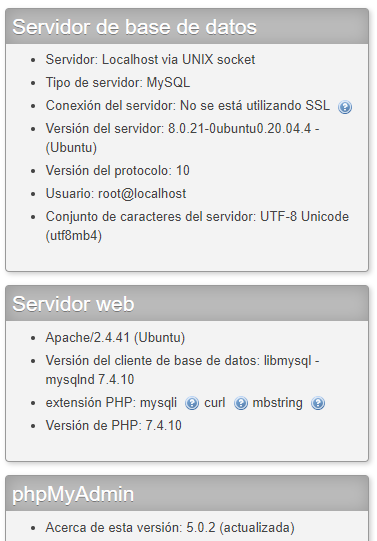
Client configuration
- Google Chrome V84.XXX:
- Windows 10 Home:
Contributor guide
First steps
- Read the whole issue, then the project's contributing guide.
- Comment on the issue to say you are picking it up — it saves two people doing the same work.
- Fork the repository and make your change on a branch.
- Open a pull request that references the issue number.
Assessment
This issue has not been assessed yet.