Wrong auto generated subtitles in youtube
Nobody has claimed this yet.
- Dominant language
- JavaScript
- Stars
- 27k
- Forks
- 2.6k
- PR merge metrics
- No merged PRs in 30d
Description
Describe the bug
Wrong auto generated subtitles in the vimium introductory video.
To Reproduce
Steps to reproduce the behavior:
- Go to URL https://youtu.be/t67Sn0RGK54?t=18
- Click on Video to play at 00:18
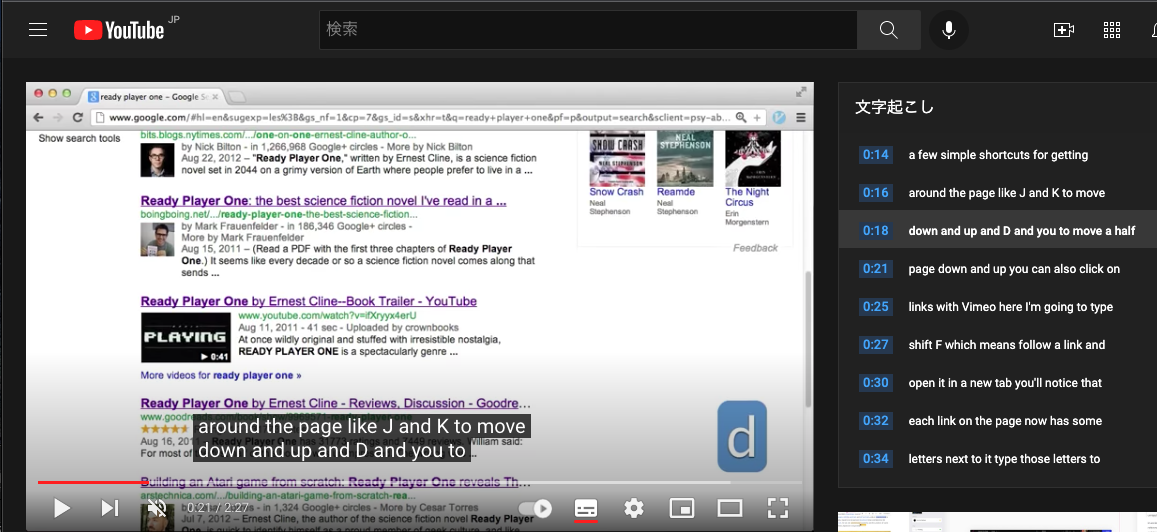
Expected
down and up and D and U to move a half
Actual
down and up and D and you to move a half
When I watched the video for the first time trying to use vimium, I have confused because there is an explanation of down (D) but no explanation of up (U).
Because I have watched the video with auto translated Japanese subtitles.
The auto generated English subtitles has 'you' instead of 'U'.
There is no description of 'U' in the subtitles due to miss translation.
Would you please add the correct English subtitles?
Contributor guide
First steps
- Read the whole issue, then the project's contributing guide.
- Comment on the issue to say you are picking it up — it saves two people doing the same work.
- Fork the repository and make your change on a branch.
- Open a pull request that references the issue number.
Research direction
Open the Vimium introductory video at https://youtu.be/t67Sn0RGK54?t=18 and check the English subtitles around 00:18, comparing them with the spoken explanation and the issue's screenshot. Done means the subtitle uses “U” rather than “you” and clearly describes the down and up movement keys.
Written by the indexing model from the issue text.
Assessment
- Domain
- content
- Issue type
- Documentation
- Difficulty
- 1/5
- Estimated time
- Under an hour
- Activity status
- Stale
- Clarity
- Clearly specified
- Newbie friendliness
- 45/100