Popup and options page are broken in firefox private mode
Open
Nobody has claimed this yet.
- Dominant language
- JavaScript
- Stars
- 27k
- Forks
- 2.6k
- PR merge metrics
- No merged PRs in 30d
Description
Describe the bug
In private mode of Firefox browser it is impossible to set rules by clicking on V icon or by using options page.
(There is an error in browser's console window)
To Reproduce
Steps to reproduce the behavior:
- Allow Vimium extension in private mode
- Go to any page
- Click on V icon

Or
2. Go to Vimium options page
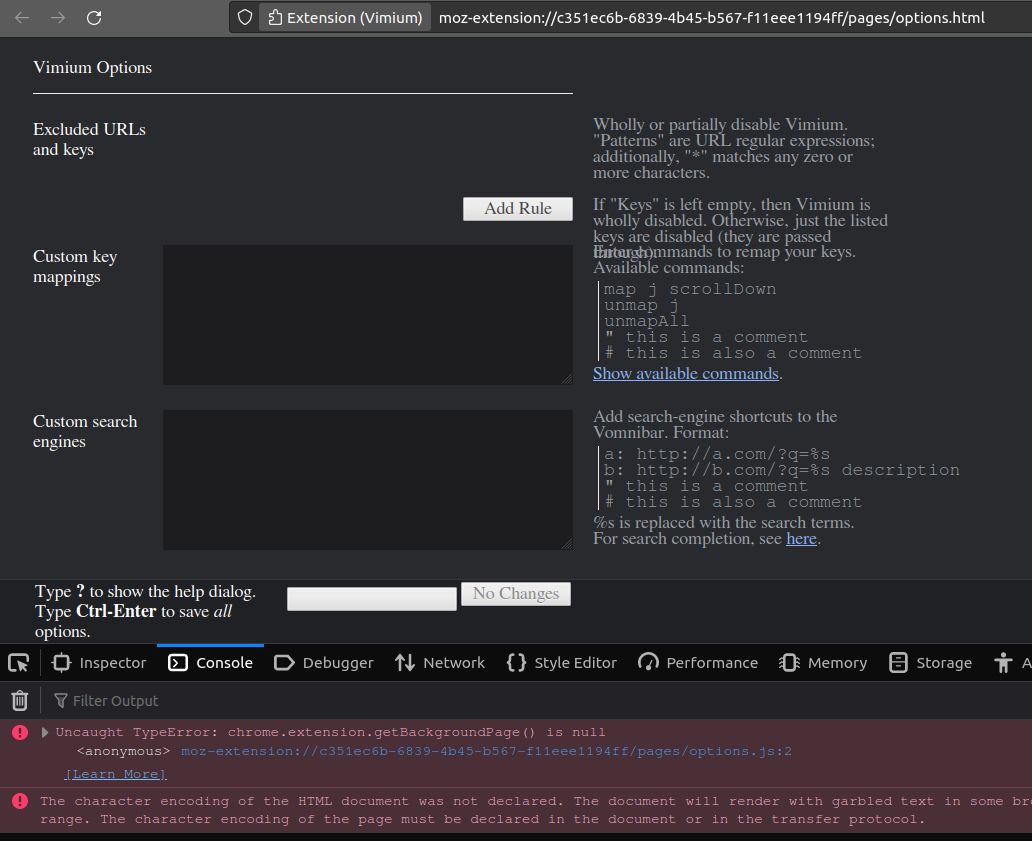
Browser and Vimium version
    "name": "Firefox",
    "osVersion": "Linux 5.11.0-46-generic #51~20.04.1-Ubuntu SMP Fri Jan 7 06:51:40 UTC 2022",
    "version": "95.0.1",
    "buildID": "20211215221728",
    "distributionID": "canonical",
    "userAgent": "Mozilla/5.0 (X11; Ubuntu; Linux x86_64; rv:95.0) Gecko/20100101 Firefox/95.0",

      "name": "Vimium",
      "type": "extension",
      "version": "1.67.1",
      "isActive": true,
      "id": "{4baa09d9-b782-4ebb-b844-dcbfd3272145}"
Contributor guide
First steps
- Read the whole issue, then the project's contributing guide.
- Comment on the issue to say you are picking it up — it saves two people doing the same work.
- Fork the repository and make your change on a branch.
- Open a pull request that references the issue number.
Research direction
Reproduce the failure in Firefox private mode by opening the extension popup and options page, then inspect the browser console and the linked Pastebin report. The issue is resolved when rules can be set from both entry points without the reported error.
Written by the indexing model from the issue text.
Assessment
- Tech stack
- javascript
- Domain
- frontend
- Issue type
- Bug
- Difficulty
- 3/5
- Estimated time
- 1-2 days
- Activity status
- Stale
- Clarity
- Mostly clear
- Newbie friendliness
- 35/100