[BUG] Conflicting folder is not removed from Files App
Open
Nobody has claimed this yet.
feature:filesApp
Type:bug
- Dominant language
- Swift
- Stars
- 251
- Forks
- 142
- Avg merge
- 2d 17h
- Merged PRs (30d)
- 3
Description
Comes from: https://github.com/owncloud/ios-app/pull/662#issuecomment-652534684. Probably, this is an internal matter of Files App. just to track the problem, in case any solution is posible:
- Open Files app
- Create a folder with the same name as an existing file -> notification pops up
- Click notification -> redirected to the app
- Solve problem in the app (folder is cancelled)
- Switch again to Files app
Current: Folder created en 2. and cancelled in 5. is not removed from Files App:
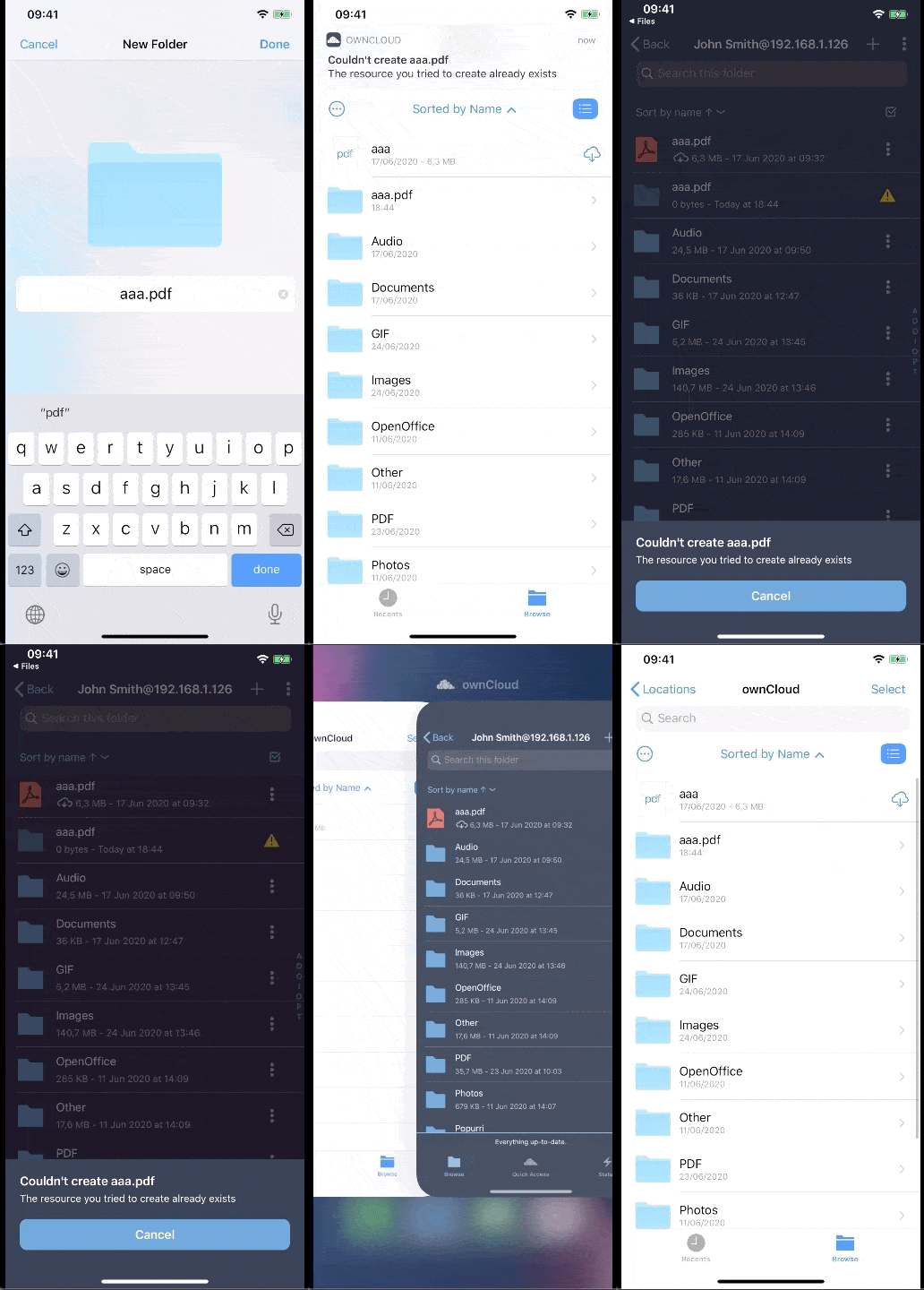
Expected: Removed from Files App as well as in the app
iPhoneXR, iOS13.4
Contributor guide
First steps
- Read the whole issue, then the project's contributing guide.
- Comment on the issue to say you are picking it up — it saves two people doing the same work.
- Fork the repository and make your change on a branch.
- Open a pull request that references the issue number.
Research direction
Start with the linked pull request #662 and its issue comment, then reproduce the conflict flow in Files and the app on the described iOS setup. Trace how the cancelled folder is handled when returning to Files. Done means the conflicting folder is removed from Files as well as from the app.
Written by the indexing model from the issue text.
Assessment
- Tech stack
- swift
- Domain
- mobile
- Issue type
- Bug
- Difficulty
- 4/5
- Estimated time
- 3-5 days
- Activity status
- Stale
- Clarity
- Needs clarification
- Newbie friendliness
- 25/100