[UX] Not obvious how to change the sort order
Nobody has claimed this yet.
- Dominant language
- Swift
- Stars
- 251
- Forks
- 142
- Avg merge
- 2d 17h
- Merged PRs (30d)
- 3
Description
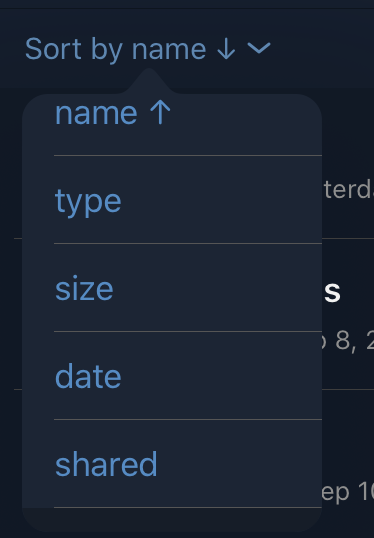
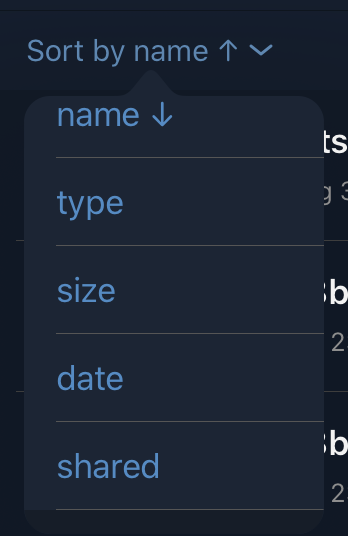
It is not very obvious and a bit irritating how changing sort order works, you have to tap sorting button sometimes twice if e.g. you want to change sorting criteria (name, type, size etc) and also to change order from ascending to descending. Since first it is always ascending and then you open the sort menu and out of sudden, the arrow shows into different direction there:
Contributor guide
First steps
- Read the whole issue, then the project's contributing guide.
- Comment on the issue to say you are picking it up — it saves two people doing the same work.
- Fork the repository and make your change on a branch.
- Open a pull request that references the issue number.
Research direction
Start by reproducing the sorting flow described in the issue in the iOS app, comparing changing the sorting criterion with changing ascending or descending order. Identify the sort button and menu entry points, then make the interaction and arrow direction consistent so users can change both choices predictably; verify the behavior manually with the available criteria.
Written by the indexing model from the issue text.
Assessment
- Tech stack
- ios, swift
- Domain
- mobile
- Issue type
- Feature
- Difficulty
- 4/5
- Estimated time
- 3-5 days
- Activity status
- Stale
- Clarity
- Needs clarification
- Newbie friendliness
- 25/100