OSQuery peformance impact from enabling BPF
Nobody has claimed this yet.
- Dominant language
- C++
- Stars
- 23.6k
- Forks
- 2.6k
- Avg merge
- 6d 7h
- Merged PRs (30d)
- 14
Description
Bug report
After enabling BPF for osquery and having any queries configured, osquery's cpu usage does have an increase in usage.
In the screenshot below, the NICE time is the usage of mainly osquery. When enabled, BPF consumes about 2-3% using the same infrastructure listed here https://github.com/osquery/osquery/issues/7326.
Testing on Ubuntu:
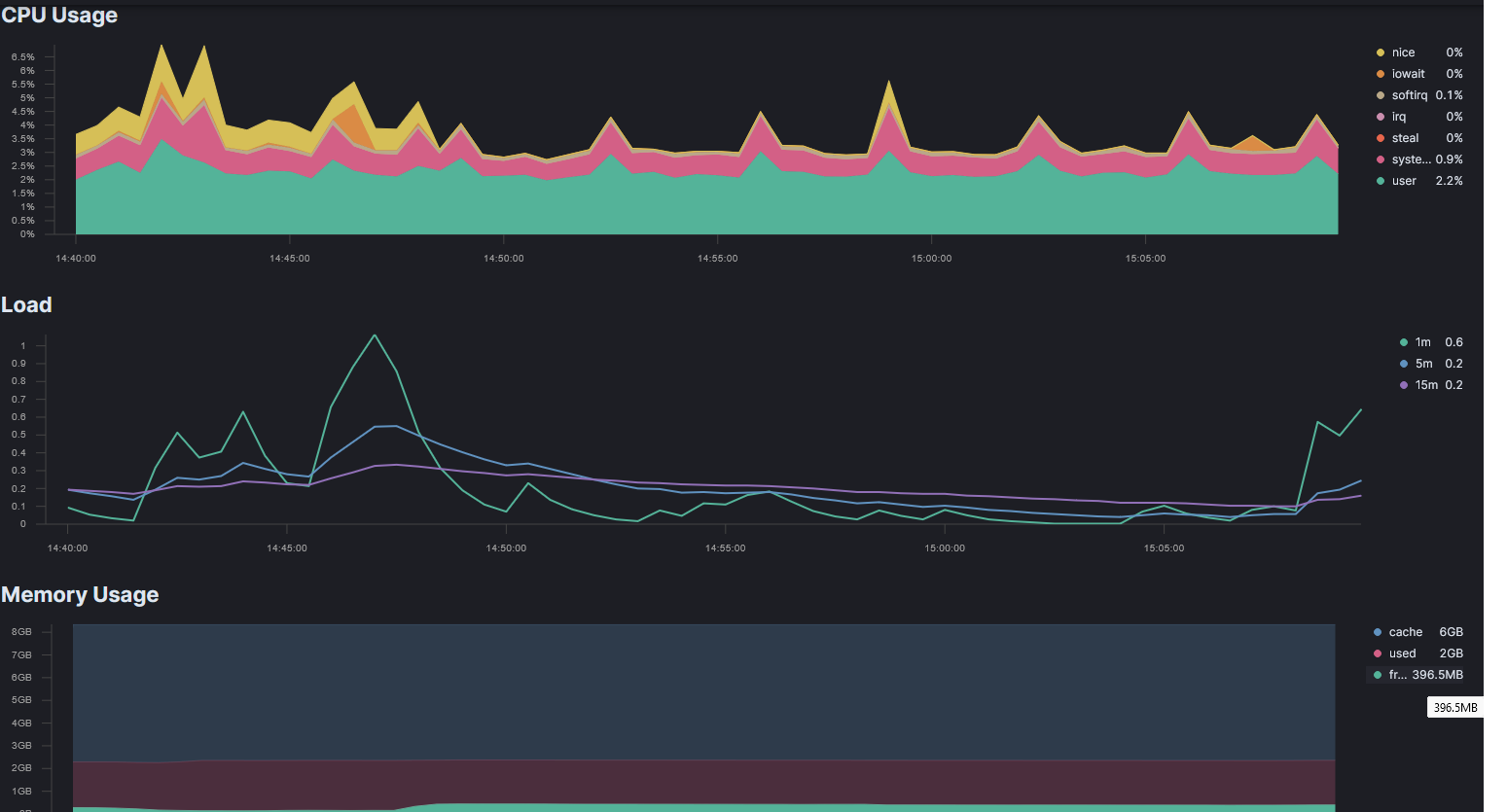
Testing on AMZN2:

While I can't share the full set of data for our AMZN2 instances, what can be seen is the average CPU usage of system + user time for a subset of instances. The red line seen around ~40% thread usage avg is for all of our redis hosts in a cluster. When reviewing our metrics for all of the instances in this cluster they all have the same rough CPU usage.
(Do keep in mind that some hosts may of still been on audit vs bpf in the above screenshot because of older kernels or not having picked up the config changes (happens at totally random times for each of our instance) before it was reverted. Any systems that did show impact had bpf enabled.)
What operating system and version are you using?
Ubuntu:
# osqueryi --line "SELECT version, build, platform FROM os_version;"
 version = 21.04 (Hirsute Hippo)
   build =
platform = ubuntu

AMZ2:
# osqueryi --line "SELECT version, build, platform FROM os_version;"
 version = 2
   build =
platform = amzn
What version of osquery are you using?
# osqueryi --line "SELECT version from osquery_info;"
version = 5.0.1
What steps did you take to reproduce the issue?
- Launch Ubuntu 21.04 or Amazon2 Linux
Ubuntu AMI: ubuntu/images/hvm-ssd/ubuntu-hirsute-21.04-amd64-server-20210908-9b889f11-a864-4343-9340-1b2042b8cd6c
Amazon 2 AMI: amzn2-ami-kernel-5.10-hvm-2.0.20210813.1-x86_64-gp2
- SSH into the instance and make sure it's up to date
Ubuntu: apt update && apt upgrade -y
AMZ2: yum clean all & yum update -y
- Install Docker
Ubuntu: sudo apt install docker
AMZ2: sudo amazon-linux-extras install docker
- Reboot if you'd like...
- Delete the contents of /etc/osquery/ / /usr/share/osquery/ to verify no configs override the launch parameters in the next step.
osqueryctl stopto verify osqueryd isn't already running- Add the following to /etc/osquery/osquery.flags
--config_plugin=filesystem
--enable_bpf_events=true
--enable_file_events=true
- Run
osqueryctl startand allow osquery's process to settle for a few minutes. - Observe usage metrics
What did you expect to see?
After enabling BPF for docker related hosts, the expected result of BPF events being captured.
What did you see instead?
When this was tested in lightly loaded environment it was found that the CPU consumption went from ~5% cpu usage to around 10% and up to 35%. Our redis instances saw the highest CPU increase going from an average of 2% to up to ~35%.
No other changes were made to osquerys configs and hosts did not have any packs installed.
I'm not entirely sure, from Github, if this is expected or if this is a known problem.
osquery.flags used for auditd:
--audit_allow_process_events=true
--audit_persist=true
--config_plugin=filesystem
--disable_events=false
--enable_file_events=true
Contributor guide
First steps
- Read the whole issue, then the project's contributing guide.
- Comment on the issue to say you are picking it up — it saves two people doing the same work.
- Fork the repository and make your change on a branch.
- Open a pull request that references the issue number.
Research direction
Start by reproducing the report on Ubuntu 21.04 or Amazon Linux 2 with osquery 5.0.1, using the listed osquery.flags and the documented Docker setup. Compare CPU usage with BPF enabled against the auditd configuration; done means the source of the increase is identified and the observed impact is addressed or clearly characterized.
Written by the indexing model from the issue text.
Assessment
- Tech stack
- cpp, docker, linux
- Domain
- observability-sre, operating-systems, performance
- Issue type
- Bug
- Difficulty
- 4/5
- Estimated time
- 3-5 days
- Activity status
- Stale
- Clarity
- Needs clarification
- Newbie friendliness
- 35/100