Issue Introduced in 22.03.0-rc4 (still there in rc5, rc6, and 22.03.0)
Nobody has claimed this yet.
- Dominant language
- C
- Stars
- 888
- Forks
- 436
- PR merge metrics
- No merged PRs in 30d
Description
Issue Description: Any Openwrt router running 22.03.0-rc4, 22.03.0-rc5, 22.03.0-rc6 or 22.03.0 on my network behaves as follows: When freshly flashed or rebooted any client attached to the router will drop packets say to 8.8.8.8 for a while on connecting to the router but then will successfully ping. I have 802.11r set up so I am used to minimal packet loss on switching base stations, so this pause in routing packets immediately got my attention. After 12 to 24 hours packets are not routeable beyond the base station at all no matter how long you wait. This can be forced to occur after the client suspends and restarts the wifi connection or you toggle wifi off and on (you dont need to wait 24hrs). If the base station ip is 10.2.1.8 it is almost immediately pingable but nothing beyond that address. My main household router (pfsense) is not pingable and obviously nor is 8.8.8.8. My Openwrt router setup works on 22.03.0-rc1 and before, and it continues to also work on all non-mt76 based firmwares. I have rolled back to 22.03.0-rc1 with no changes in setup to keep things running. I have experienced this issue on working 22.03.0-rc1 routers upgraded to 22.03.0-rc4, 22.03.0-rc5, 22.03.0-rc6 and release 22.03.0. To make sure there are no dangling incompatible settings I did a fresh from scratch install of 22.03.0-rc6 and then hand configured it to match my normal setup and I still have the same behavior. This does not seem to be hardware specific as it is happening on at least three different mt76 based sets of hardware (Netgear R6220, Totolink X5000R, Linksys E8450 (UBI)).
My Network: [cable modem] <-> [Pfsense Router] <-> 2* [Openwrt 22.03.0-rc1 base stations]
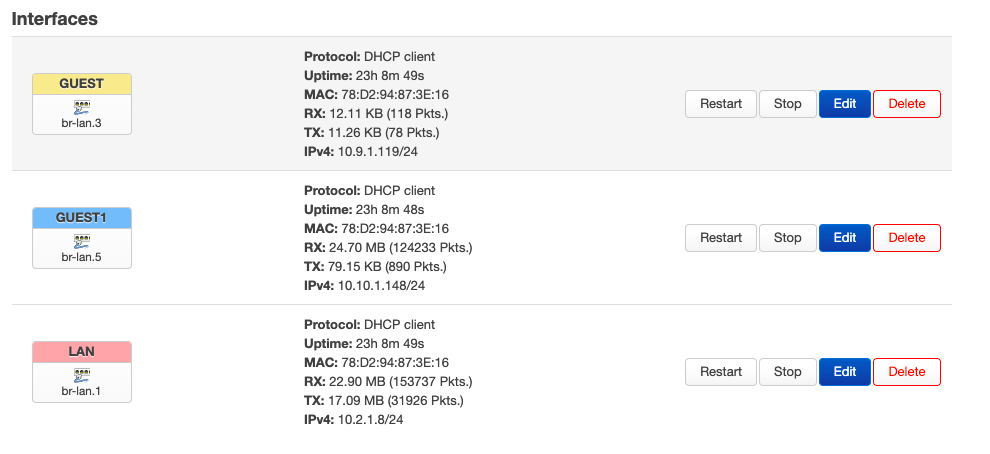
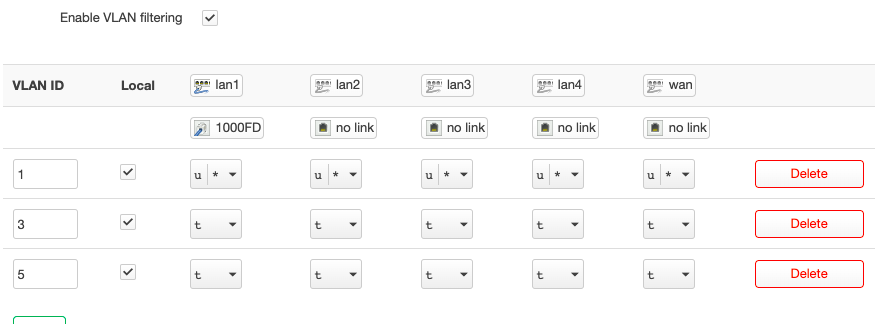
All my network and routing services are handled by my pfsense router. My two Openwrt base stations are just there for wireless connectivity. I have no WAN network on my Openwrt boxes. I have a LAN network on vlan br-lan.1. I have two guest networks on br-lan.3 and br-lan.5 respectively. There is nothing wrong with my vlan setup and I use it to segment traffic between my main network an IOT network and a guest network. Wireless appears to be unaffected and working correctly... It is routing to my router and beyond that is an issue.
One difference I have noticed is on 22.03.0-rc1 the global target and gateway are on lan:
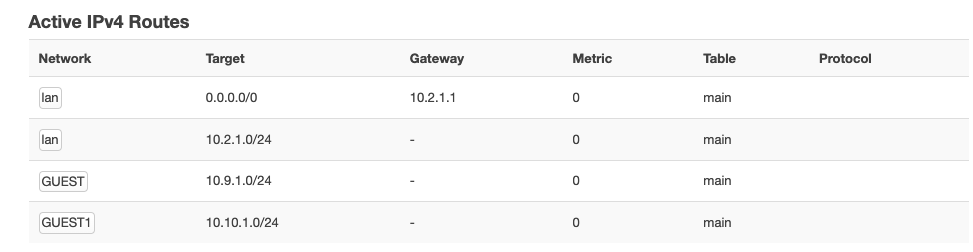
on 22.03.0-rc6 the global target and gateway is on GUEST1
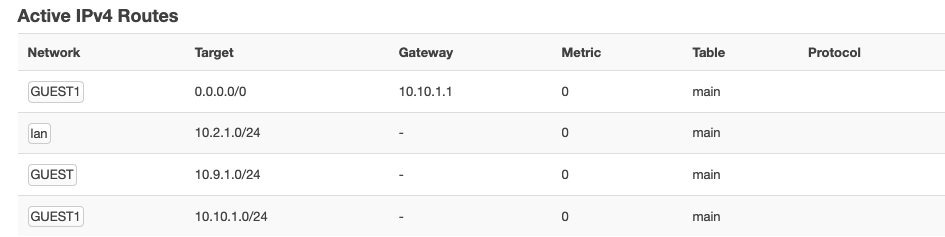
I dont know if this is a red herring or is significant...
Some additional screenshots that show my setup:
I apologize for this somewhat nebulous report.
Contributor guide
No contributing guide indexed for this repository
First steps
- Read the whole issue, then the project's contributing guide.
- Comment on the issue to say you are picking it up — it saves two people doing the same work.
- Fork the repository and make your change on a branch.
- Open a pull request that references the issue number.
Research direction
Start by reproducing the routing failure on the listed MT76 hardware with 22.03.0-rc1 and the affected rc4, rc5, rc6, or 22.03.0 firmware, including a Wi-Fi reconnect or client suspend. Compare the behavior after reboot and after 12–24 hours; done means identifying the regression and restoring routing beyond the base station.
Written by the indexing model from the issue text.
Assessment
- Tech stack
- c
- Domain
- networking
- Issue type
- Bug
- Difficulty
- 4/5
- Estimated time
- 3-5 days
- Activity status
- Stale
- Clarity
- Needs clarification
- Newbie friendliness
- 25/100