openstreetmap / openstreetmap/openstreetmap-website
Highlighting objects on mobile
Nobody has claimed this yet.
- Dominant language
- Ruby
- Stars
- 2.8k
- Forks
- 1.1k
- Avg merge
- 1d 20h
- Merged PRs (30d)
- 38
Description
I’m opening https://www.openstreetmap.org/way/26904597 on an iPhone 6s in Safari/Chrome. Instead of displaying the object in the map center, it’s shown in the lower left corner. When panning the map the object marker even disappears. In addition there’s a largish grey area where I’d expect a map. Please take a look the two screenshots below.
Chrome
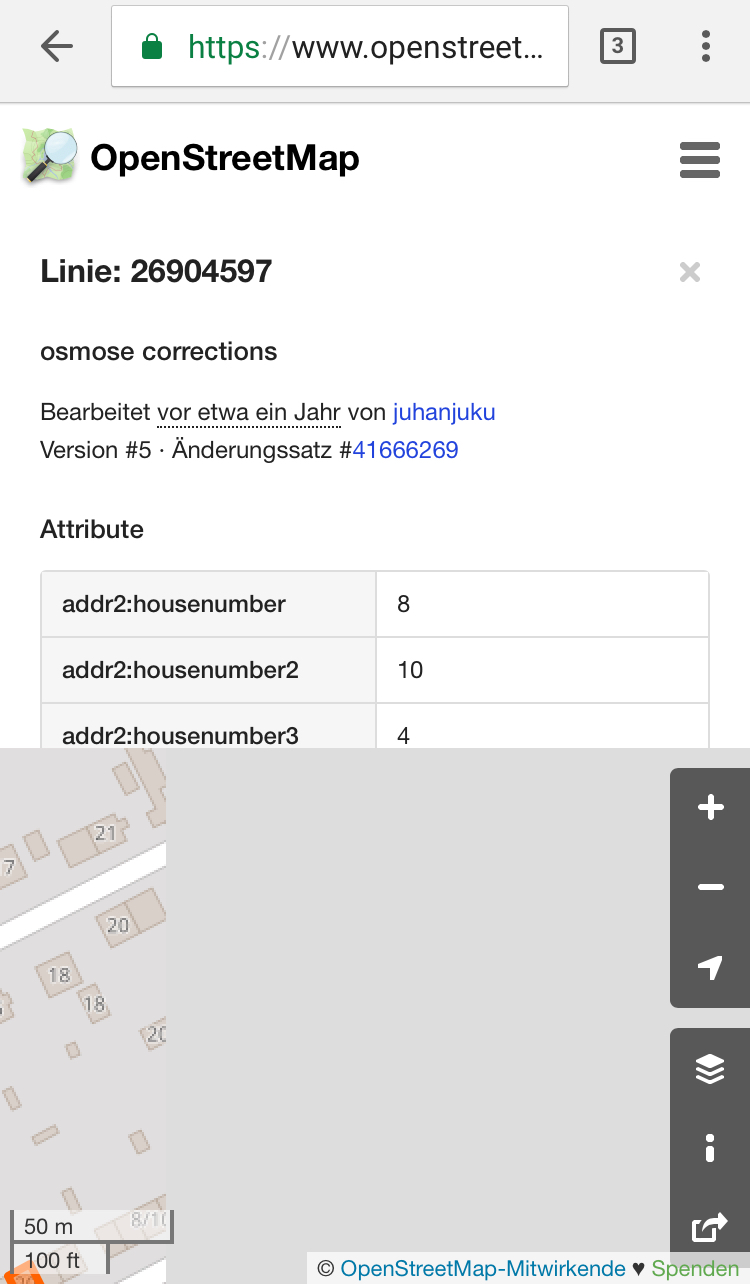
Safari

Contributor guide
First steps
- Read the whole issue, then the project's contributing guide.
- Comment on the issue to say you are picking it up — it saves two people doing the same work.
- Fork the repository and make your change on a branch.
- Open a pull request that references the issue number.
Research direction
Reproduce the issue by opening the linked OpenStreetMap way on an iPhone 6s in Safari and Chrome, using the two screenshots as the visual reference. Investigate the mobile map view and object highlighting behavior; done means the object is centered, its marker remains visible while panning, and the grey map area is gone.
Written by the indexing model from the issue text.
Assessment
- Tech stack
- ruby
- Domain
- frontend, mobile-dev
- Issue type
- Bug
- Difficulty
- 4/5
- Estimated time
- 3-5 days
- Activity status
- Stale
- Clarity
- Mostly clear
- Newbie friendliness
- 35/100