openlibhums / openlibhums/janeway
Preprints: Add support for read-only custom fields
Nobody has claimed this yet.
- Dominant language
- Python
- Stars
- 238
- Forks
- 97
- Avg merge
- 9d 1h
- Merged PRs (30d)
- 8
Description
Is your feature request related to a problem? Please describe.
As a preprints administrator, I want to be able to collect and store certain metadata about a preprint via custom fields, but not have those fields display to the submitting author in the submission form or author dashboard view page.
For example, such fields could be house metadata about the API client which added a preprint to Janeway repository.
Describe the solution you'd like
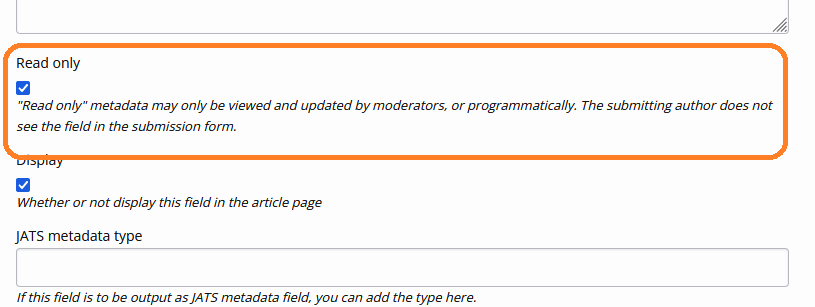
Add a new ticky box option to the custom field setup page: Read Only
Authors do not see "Read Only" fields during the submission process, nor on their author dashboard.
Managers and administrators/staff can see and update the fields in the /repository/manager/XXXX page.
Additional context
Contributor guide
First steps
- Read the whole issue, then the project's contributing guide.
- Comment on the issue to say you are picking it up — it saves two people doing the same work.
- Fork the repository and make your change on a branch.
- Open a pull request that references the issue number.
Research direction
Start at the custom field setup page and trace how fields are shown in the submission form, author dashboard view, and /repository/manager/XXXX page. Check the existing custom-field handling and permissions before defining the change. Done means a Read Only option hides fields from authors while allowing managers and administrators/staff to view and update them.
Written by the indexing model from the issue text.
Assessment
- Tech stack
- python
- Domain
- full-stack
- Issue type
- Feature
- Difficulty
- 4/5
- Estimated time
- 3-5 days
- Activity status
- Stale
- Clarity
- Mostly clear
- Newbie friendliness
- 45/100