openlibhums / openlibhums/janeway
Uploading large files leads multiple copies of same file being uploaded by users.
@ajrbyers is already working on this.
Since Jul 15, 2026.
- Dominant language
- Python
- Stars
- 238
- Forks
- 97
- Avg merge
- 9d 1h
- Merged PRs (30d)
- 8
Description
Describe the bug
Janeway allows the submitting author to upload primary manuscript PDF again and again. There isn't an indication that an item is being uploaded, or has been uploaded, so it isn't clear to authors what has occurred. The UI suggests that they are replacing the original file when they upload a new one (or authors aren't noticing the area of the screen where the uploaded file is displayed), but on the Moderator end, each file that gets uploaded is added to the files list. (i.e. Author thinks only 1 file is uploaded; Moderator sees several files)
Janeway version
Repository from early version
To Reproduce
Steps to reproduce the behavior:
- Submit a preprint or submit an update/new version to an existing preprint
- Try to attach a large file; after clicking submit, click it again and again until submission is complete
- Open the preprint in moderator view and see multiple versions of the same file uploaded
Expected behavior
- User would see some visual indication that an upload is in progress
- User would receive error if they tried to upload multiple files with the same name OR
- User would see a list of the file(s) uploaded and given option to select the file intended to be V1 of their preprint (see: https://github.com/BirkbeckCTP/janeway/issues/3755)
Actual behavior
- User does not see any indication that file is uploading
- User only sees one file as having been uploaded
- Moderator sees multiple files with same name
Screenshots
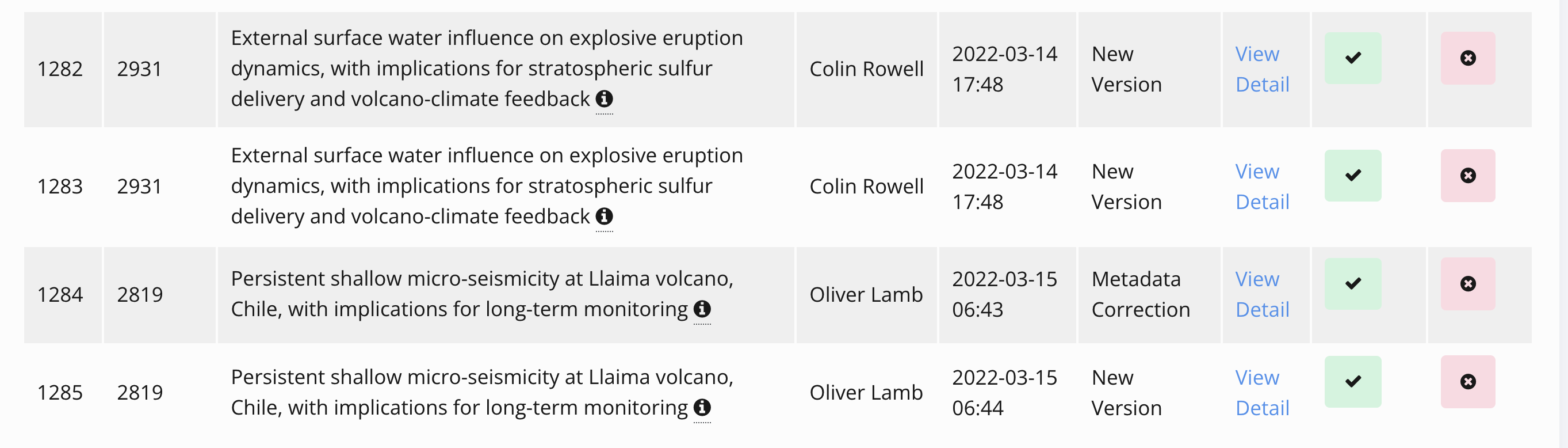
Additional context
May also be occurring on the journal side
Dev Notes
- We discussed implementing a progress bar and handle the upload asynchronously which should help users track the progress. We could also disable the upload button while another file is being uploaded.
Contributor guide
First steps
- Read the whole issue, then the project's contributing guide.
- Comment on the issue to say you are picking it up — it saves two people doing the same work.
- Fork the repository and make your change on a branch.
- Open a pull request that references the issue number.
Assessment
This issue has not been assessed yet.