apply_patch deletes a file when Move to matches the source
Nobody has claimed this yet.
Assessment
- Difficulty
- 3/5
- Estimated time
- 1-2 days
- Newbie friendliness
- 48/100
Research direction
Start by reproducing the same-file move with the apply_patch command shown, then inspect the move branch in the codex-apply-patch package. Run just test -p codex-apply-patch and add or verify a CLI regression test; done means the command leaves foo.txt present with content after without regressing other move behavior.
Written by the indexing model from the issue text.
Description
What version of Codex CLI is running?
Source build from main at 312caf176a8fd3a5897a3d1fd3ed0a283bd1b5ac.
What subscription do you have?
N/A — direct source-level reproduction.
Which model were you using?
N/A — the failure reproduces by invoking the apply_patch binary directly.
What platform is your computer?
Darwin 25.5.0 arm64 arm
What terminal emulator and version are you using (if applicable)?
VS Code integrated terminal.
Codex doctor report
Not applicable for this direct source build reproduction.
What issue are you seeing?
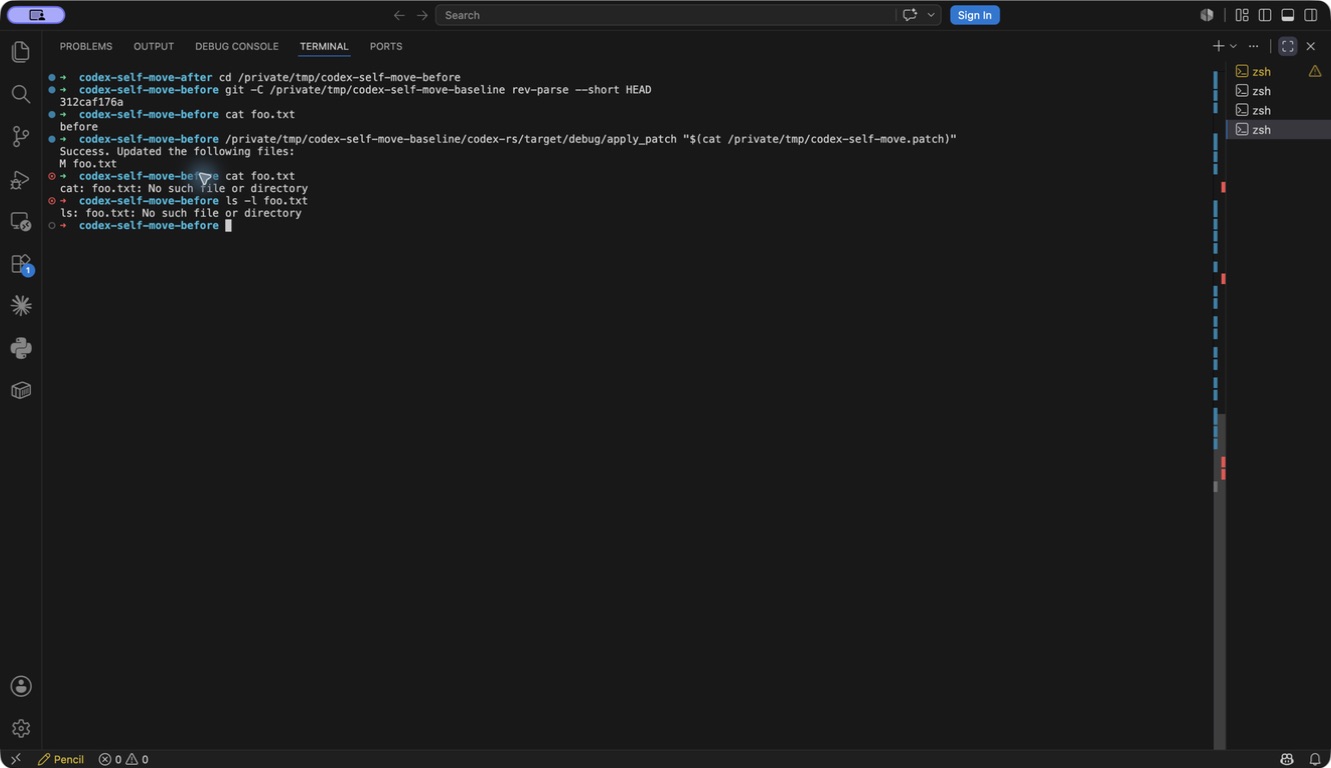
apply_patch reports a successful update and then deletes the file when *** Move to: names the same path as *** Update File:.
- Observable sequence: start with
foo.txtcontainingbefore, then update and movefoo.txttofoo.txt. - Expected:
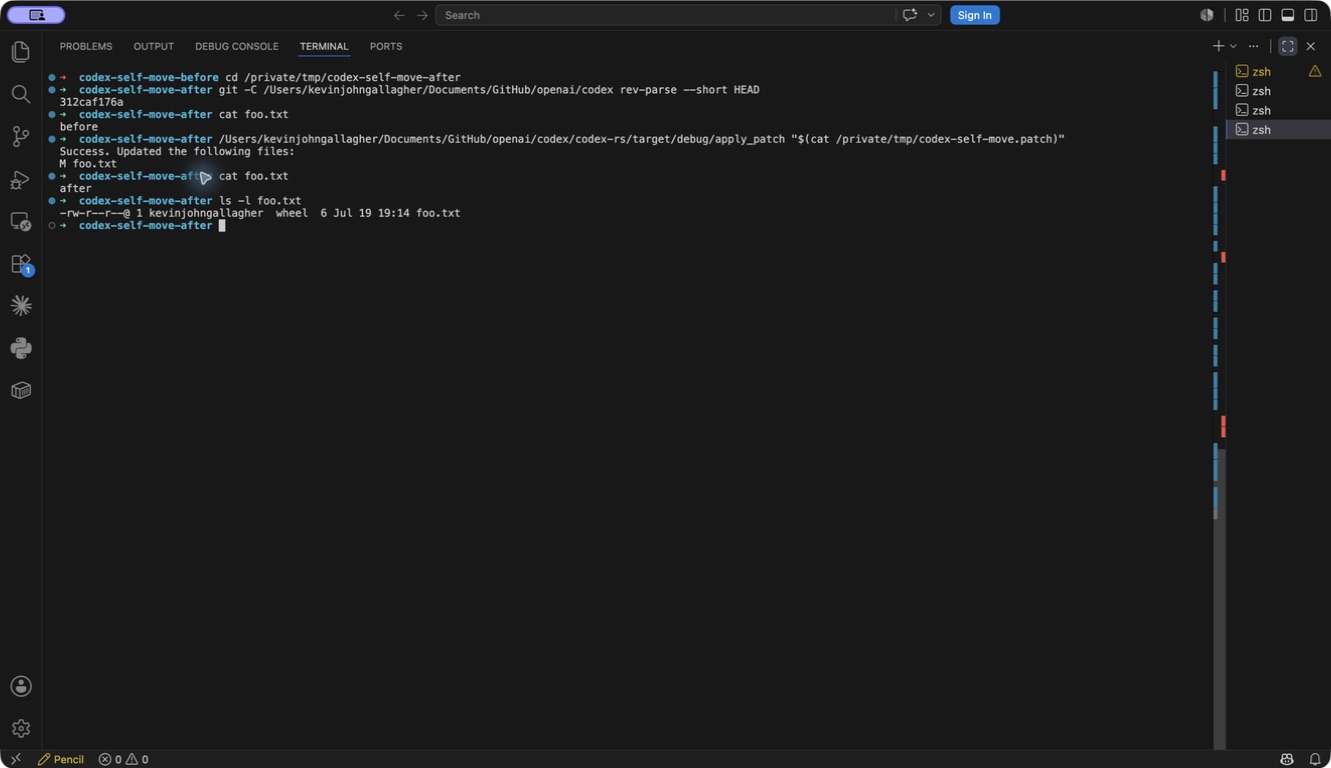
foo.txtremains present with contentafter. - Actual:
apply_patchreports success, thenfoo.txtis missing.
Actual screenshots
Before — upstream 312caf176a: success is reported, then both cat and ls show that foo.txt was deleted.
After — the same base revision with the focused local patch: success is reported, cat prints after, and ls confirms that foo.txt remains present.
What steps can reproduce the bug?
Build the current source and run this in a temporary directory:
printf 'before\n' > foo.txt

/path/to/apply_patch '*** Begin Patch
*** Update File: foo.txt
*** Move to: foo.txt
@@
-before
+after
*** End Patch'

cat foo.txt
ls -l foo.txt
The command exits successfully and prints:
Success. Updated the following files:
M foo.txt
Both follow-up commands then report that foo.txt does not exist.
What is the expected behavior?
A same-file move should either apply as an in-place update, leaving foo.txt present with content after, or reject the patch before mutating the file.
Additional information
The move branch writes new_contents to the destination and then unconditionally removes the source. When the resolved source and destination are the same file, that removal deletes the file that was just updated.
The earlier report #6358 was closed because the bug was thought to be no longer relevant, with a request to open a new report if it reproduced on the latest version. It still reproduces on current main.
A focused patch is prepared that:
- treats exact or canonical same-file moves as in-place updates;
- skips source removal for that case;
- adds a CLI regression test proving the file remains and contains
after.
Validation completed:
just test -p codex-apply-patch: 87 passed;just fix -p codex-apply-patch;just fmt.
I have a focused patch prepared and can open it once given the green light.
- Dominant language
- Rust
- Stars
- 125k
- Forks
- 19.5k
- Avg merge
- 1m
- Merged PRs (30d)
- 1k
Contributor guide
First steps
- Read the whole issue, then the project's contributing guide.
- Comment on the issue to say you are picking it up — it saves two people doing the same work.
- Fork the repository and make your change on a branch.
- Open a pull request that references the issue number.
More from openai/codex
-
enhancement remote
Difficulty 2/5 1-3 hours Newbie friendliness 68/100
-
bug CLI windows-os
Difficulty 2/5 1-3 hours Newbie friendliness 76/100
-
macOS sandbox blocks hw.optional.arm64 sysctl, causing Flutter to misdetect Apple Silicon as x64 Openbug CLI sandbox
Difficulty 2/5 1-3 hours Newbie friendliness 78/100
-
bug CLI TUI
Difficulty 2/5 1-3 hours Newbie friendliness 90/100
-
CLI config enhancement skills
Difficulty 2/5 1-3 hours Newbie friendliness 84/100
Similar issues
-
Difficulty 2/5 1-3 hours Newbie friendliness 86/100
kwakseongjae/auto-hwp#319 ·
-
area:cli bug filter-quality good first issue priority:medium
Difficulty 2/5 1-3 hours Newbie friendliness 84/100
-
Difficulty 1/5 Under an hour Newbie friendliness 72/100
bevyengine/bevy#25861 ·
-
comp-datalake
Difficulty 2/5 1-3 hours Newbie friendliness 88/100
ClickHouse/ClickHouse#121222 ·
-
A-linter
Difficulty 2/5 1-3 hours Newbie friendliness 72/100
oxc-project/oxc#26863 ·