obsproject / obsproject/obs-studio
Twitch panels option disappears when you duplicate a profile
Nobody has claimed this yet.
- Dominant language
- C
- Stars
- 76.4k
- Forks
- 10.2k
- Avg merge
- 4d 23h
- Merged PRs (30d)
- 12
Description
Operating System Info
Other
Other OS
Manjaro - flatpak version
OBS Studio Version
27.2.4
OBS Studio Version (Other)
Flatpak
OBS Studio Log URL
https://obsproject.com/logs/AmsUWRZkq7B8488Y
OBS Studio Crash Log URL
No response
Expected Behavior
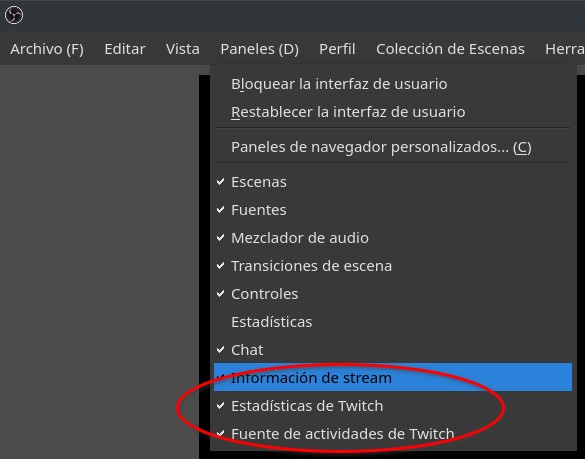
I can use the twitch panels after duplicate my original profile:
Current Behavior
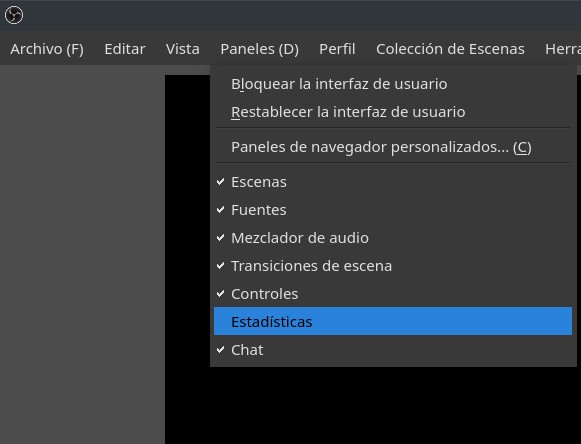
I lost panels options in my original profile after duplicate:
Steps to Reproduce
1.- I have a twitch profile with the account connected.
2.- In the interface I can activate different twitch panels (chat, information, etc.).
3.- I duplicate my twitch profile with a new name.
4.- My new duplicated profile I can activate all twitch panels.
5.- My original profile has disappeared twitch panels, except the chat panel.
6.- It is not possible to restore the panels or activate it again in the original profile.
Anything else we should know?
No response
Contributor guide
First steps
- Read the whole issue, then the project's contributing guide.
- Comment on the issue to say you are picking it up — it saves two people doing the same work.
- Fork the repository and make your change on a branch.
- Open a pull request that references the issue number.
Research direction
Start by reproducing the profile-duplication sequence on the reported Manjaro Flatpak setup, using the linked OBS log for context. Trace the profile duplication flow and Twitch panel state handling; the issue is done when duplicating a connected Twitch profile no longer removes panels from the original profile and the panels remain restorable.
Written by the indexing model from the issue text.
Assessment
- Tech stack
- c
- Domain
- desktop
- Issue type
- Bug
- Difficulty
- 4/5
- Estimated time
- 3-5 days
- Activity status
- Quiet
- Clarity
- Mostly clear
- Newbie friendliness
- 45/100