obsproject / obsproject/obs-studio
Substract Windows taskbar height when calculating dimensions for pop-up windows
Nobody has claimed this yet.
- Dominant language
- C
- Stars
- 76.4k
- Forks
- 10.2k
- Avg merge
- 4d 23h
- Merged PRs (30d)
- 12
Description
Operating System Info
Windows 10
Other OS
No response
OBS Studio Version
Other
OBS Studio Version (Other)
27.1.3
OBS Studio Log URL
n/a
OBS Studio Crash Log URL
No response
Expected Behavior
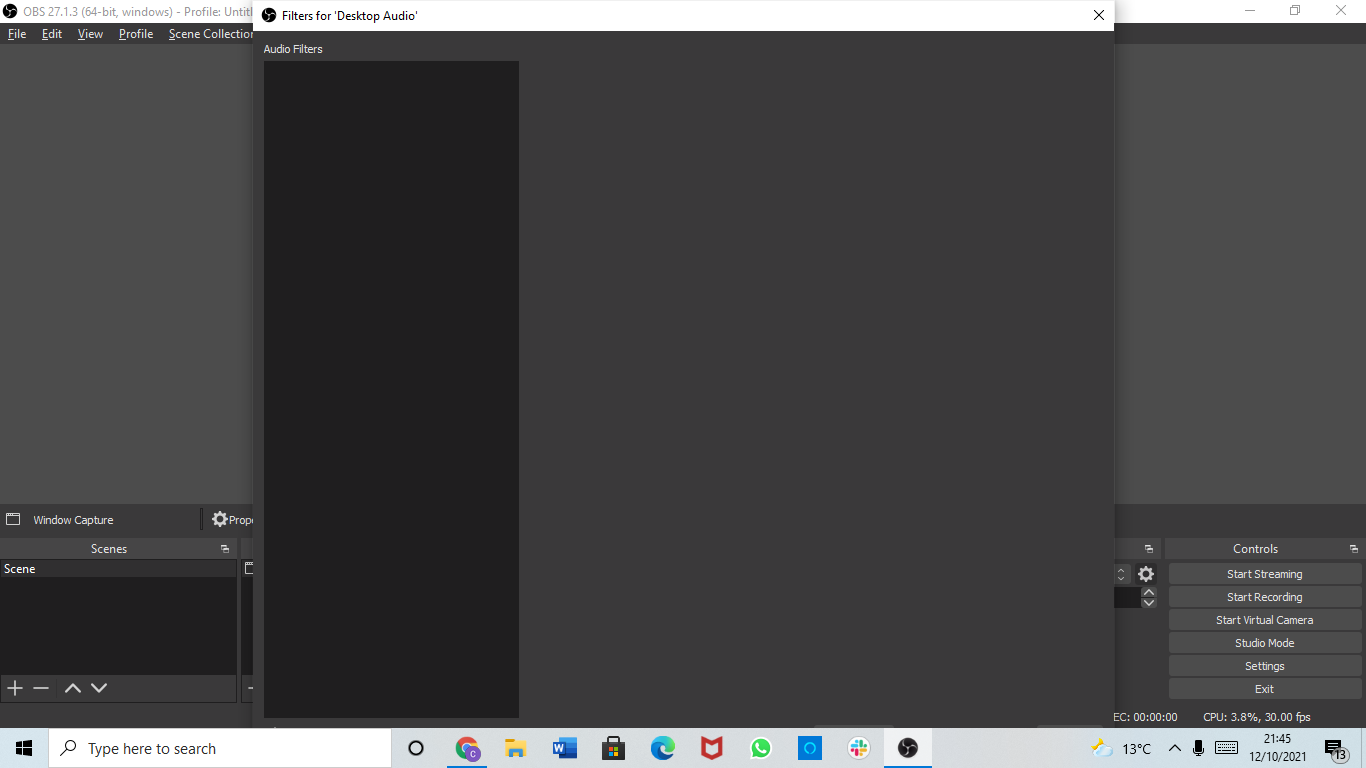
When creating a new dialogue window, such as Filters, subtract the taskbar's height from the initial height of the created window to avoid parts of window being overlapped.
Current Behavior
When opening a Filters dialog window at low resolutions (i.e. 1366x768 or lower), the Filters dialog tries to occupy the entire vertical space, and so the control buttons at the bottom get overlapped by the taskbar, rendering them unusable until a manual resize is done. This confuses the user.
Steps to Reproduce
- Set display res to 1366x768 or lower, with DPI scaling of 125% or higher
- Open any Filters dialogue window
Anything else we should know?
No response
Contributor guide
First steps
- Read the whole issue, then the project's contributing guide.
- Comment on the issue to say you are picking it up — it saves two people doing the same work.
- Fork the repository and make your change on a branch.
- Open a pull request that references the issue number.
Research direction
Start by locating the Windows code that creates the Filters dialog and determines its initial dimensions; the issue names no file or test. Reproduce at 1366x768 or lower with 125% or higher DPI scaling, then verify that the dialog's bottom controls remain usable without manual resizing.
Written by the indexing model from the issue text.
Assessment
- Tech stack
- c
- Domain
- desktop, operating-systems
- Issue type
- Bug
- Difficulty
- 3/5
- Estimated time
- 1-2 days
- Activity status
- Stale
- Clarity
- Mostly clear
- Newbie friendliness
- 38/100