[BUG] Optional dependencies not exluded when sourcing from alternate registry
Nobody has claimed this yet.
- Dominant language
- JavaScript
- Stars
- 10.1k
- Forks
- 4.7k
- Avg merge
- 2d 2h
- Merged PRs (30d)
- 19
Description
Is there an existing issue for this?
- I have searched the existing issues
This issue exists in the latest npm version
- I am using the latest npm
Current Behavior
optionalPackages sourced from npm.pkg.github.com that have an unmatching os or cpu package.json field relative to the running machine install to node_modules.
Expected Behavior
Optional packages should not be saved when filters exclude them. Behavior should be consistent whether a package if sourced from npm, npm.pkg.github.com, or git+https.
Steps To Reproduce
When using this package.json:
{
  "name": "base",
  "version": "1.0.0",
  "optionalDependencies": {
    "from-github": "git+https://github.com/obsius/from-github",
    "@obsius/from-pkg": "1.0.0"
  }
}
Sourcing these two packages:
(1) From Github
{
  "name": "from-github",
  "version": "1.0.0",
  "os": [
    "linux"
  ]
}
(2) From custom registry (npm.pkg.github.com):
{
  "name": "@obsius/from-pkg",
  "version": "1.0.0",
  "publishConfig": {
    "@obsius:registry": "https://npm.pkg.github.com"
  },
  "os": [
    "linux"
  ]
}
The following output is observed running npm install --ddd:
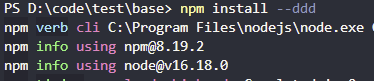
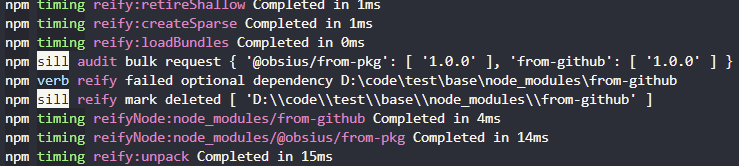
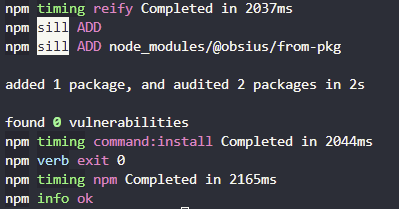
Even though the two packages are identical, only the git+https sourced one is excluded from install. I'd expect both packages to be excluded in this situation.
When running on NPM < 7 (6.14.17), the following output is observed:


In this older version of NPM, the expected behavior is observed, and neither package in installed.
Environment
- npm: 8.19.2
- Node.js: 16.18.0
- OS Name: Windows 11
- System Model Name: PC
Contributor guide
First steps
- Read the whole issue, then the project's contributing guide.
- Comment on the issue to say you are picking it up — it saves two people doing the same work.
- Fork the repository and make your change on a branch.
- Open a pull request that references the issue number.
Research direction
Start with the provided package.json reproduction and run npm install --ddd on a machine whose os or cpu does not match the optional packages. Compare filtering for the npm.pkg.github.com, git+https, and npm sources. Done means all excluded optional packages are consistently absent from node_modules, including those fetched from an alternate registry.
Written by the indexing model from the issue text.
Assessment
- Tech stack
- javascript, nodejs
- Domain
- cli, tooling
- Issue type
- Bug
- Difficulty
- 4/5
- Estimated time
- 3-5 days
- Activity status
- Stale
- Clarity
- Mostly clear
- Newbie friendliness
- 42/100