[BUG] npm global bin scripts break cmd's prompt
Nobody has claimed this yet.
- Dominant language
- JavaScript
- Stars
- 10.1k
- Forks
- 4.7k
- Avg merge
- 2d 2h
- Merged PRs (30d)
- 19
Description
Is there an existing issue for this?
- I have searched the existing issues
This issue exists in the latest npm version
- I am using the latest npm
Current Behavior
I have checked Both node.js' and my scripts. They are working correctly when I launch them using node path/to/js/file.js, but when I publish the package and install it globally Cmd's prompt is broken.
Basically I have a prompt that goes like [~\drive\path..] » and this so-called prompt is gone when I launch 'npm' or any other globally installed npm package for that matter.
Here's an example.
When executed with node

When executed with npm
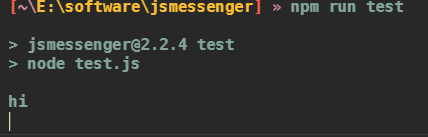
And the prompt disappears. I can still run commands and type, and I see my entry, but I don't see the main prompt there.
This is fixed when I execute 'cmd' which then spawns the shell again.
This issue is only about command prompt, so I tried every single possible command/script I know, and none of them have the issue. Commands work fine.
This issue first occured when I updated my node.js version, which also updated my npm version, I guess.
I tried downgrading to my old npm version but this doesn't seem to help either.
I attempted to update windows thinking this may be related to cmd instead of npm but this did not work.
Please note that this issue is not limited to npm and covers all 'bin' scripts within appdata\npm\.
This issue only occurs with cmd, windows powershell & cygwin work fine.
Expected Behavior
When any npm package bin script is executed, my prompt should reappear.
Steps To Reproduce
I'm afraid I don't know how to reproduce this behavior.
Environment
- npm: npm@8.18.0
- Node.js: v16.17.0 (I tried downloading the latest version, although this does not seem to fix the issue.)
- OS Name: Windows 11
- System Model Name: I'm on a desktop PC.
- npm config:
; "builtin" config from C:\Users\winpc\AppData\Roaming\npm\node_modules\npm\npmrc

prefix = "C:\\Users\\winpc\\AppData\\Roaming\\npm"

; "user" config from C:\Users\winpc\.npmrc

//registry.npmjs.org/:_authToken = (protected)

; node bin location = C:\Program Files\nodejs\node.exe
; node version = v16.17.0
; npm local prefix = E:\software\jsmessenger
; npm version = 8.18.0
; cwd = E:\software\jsmessenger
; HOME = C:\Users\winpc
; Run `npm config ls -l` to show all defaults; copy and paste output from `npm config ls` here
Contributor guide
First steps
- Read the whole issue, then the project's contributing guide.
- Comment on the issue to say you are picking it up — it saves two people doing the same work.
- Fork the repository and make your change on a branch.
- Open a pull request that references the issue number.
Research direction
Start by comparing a globally installed bin script under Windows cmd with the same JavaScript file launched through node, using the npm@8.18.0 and Node.js v16.17.0 environment described. Investigate the global bin scripts in AppData\npm and confirm that the cmd prompt disappears while PowerShell and Cygwin remain unaffected; done means the prompt reappears after any npm package bin script exits.
Written by the indexing model from the issue text.
Assessment
- Tech stack
- javascript, node.js
- Domain
- cli, operating-systems, tooling
- Issue type
- Bug
- Difficulty
- 4/5
- Estimated time
- 3-5 days
- Activity status
- Stale
- Clarity
- Needs clarification
- Newbie friendliness
- 25/100