[BUG] NPM clashes node file with PATH node on Windows
Nobody has claimed this yet.
- Dominant language
- JavaScript
- Stars
- 10.1k
- Forks
- 4.7k
- Avg merge
- 2d 2h
- Merged PRs (30d)
- 19
Description
Is there an existing issue for this?
- I have searched the existing issues
This issue exists in the latest npm version
- I am using the latest npm
Current Behavior
After a lot of back & forth, I've come to nail down a rare issue. When there's an npm script that calls node /some/file.js and there's a node.js file on the root where NPM is called, the script is invoked which results in an error.
Expected Behavior
Should not error.
Steps To Reproduce
- On windows
- Open PowerShell
- Run
mkdir test
cd test
npm init -y
- Create two files:
index.jsandnode.js
Context of index.js:
console.log('test');
Context of node.js
module.exports = {};
- Update
package.jsonto be like:
{
  "name": "test",
  "version": "1.0.0",
  "description": "",
  "main": "test.js",
  "scripts": {
-    "test": "echo \"Error: no test specified\" && exit 1"
+    "test": "node test.js"
  },
  "keywords": [],
  "author": "",
  "license": "ISC"
}
- Run
npm t
- See error...
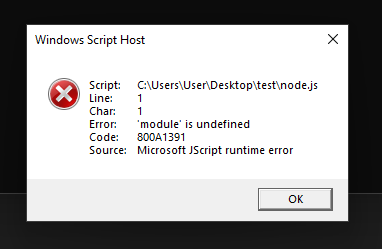
If the file isn't present, it runs OK and outputs test on stdout as expected.
Environment
- npm: 8.19.0
- Node.js: 16.17.0
- OS Name: Windows 11
- System Model Name: Macbook Pro (VirtualBox machine)
- npm config:
; node bin location = C:\Program Files\nodejs\node.exe
; node version = v16.17.0
; npm local prefix = C:\Users\User\Desktop\10up-toolkit
; npm version = 8.19.0
; cwd = C:\Users\User\Desktop\10up-toolkit\packages\eslint-config
; HOME = C:\Users\User
; Run `npm config ls -l` to show all defaults.
Contributor guide
First steps
- Read the whole issue, then the project's contributing guide.
- Comment on the issue to say you are picking it up — it saves two people doing the same work.
- Fork the repository and make your change on a branch.
- Open a pull request that references the issue number.
Research direction
Reproduce the Windows PowerShell case using package.json, index.js, and node.js, then run npm t with and without node.js present. Compare the command resolution and error behavior, and consider the issue done when the script runs successfully and prints the expected output in the reported setup.
Written by the indexing model from the issue text.
Assessment
- Tech stack
- javascript, node.js
- Domain
- cli
- Issue type
- Bug
- Difficulty
- 4/5
- Estimated time
- 3-5 days
- Activity status
- Stale
- Clarity
- Mostly clear
- Newbie friendliness
- 35/100