notepad-plus-plus / notepad-plus-plus/notepad-plus-plus
Window title bar doesn't appear
Nobody has claimed this yet.
- Dominant language
- C++
- Stars
- 29.4k
- Forks
- 5.4k
- PR merge metrics
- No merged PRs in 30d
Description
Hello!
Description of the Issue
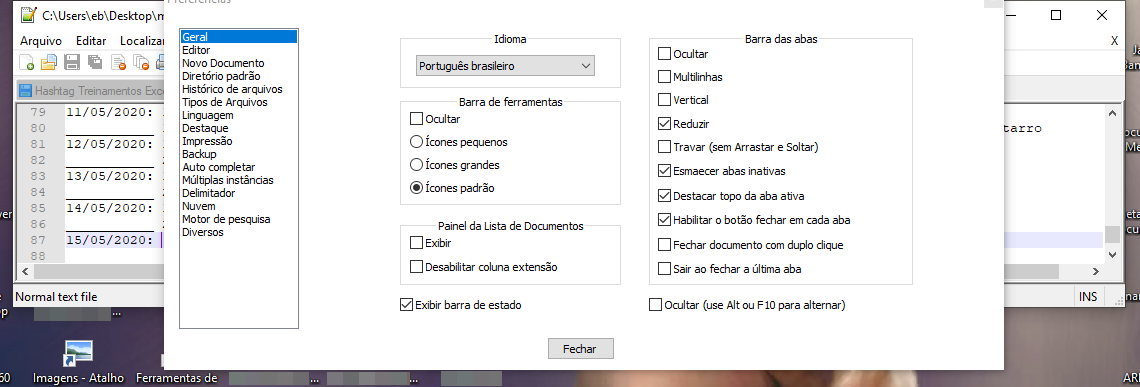
I use Notepad++ Window on the top of the screen.
When I go to Configurations/Preferences... it opens a new window where I configure everything. But since Notepad++ is already on the top of the screen, the window that open doesn't show it's top. I can't see the title bar and I can't move the window.
Steps to Reproduce the Issue
- Put the Notepad++ window on the top of the screen
- Open Configurations/Preferences...
- Can't move the window
Expected Behavior
I was waiting for the Preferences window to open entirely on the screen, so I could use it properly.
Actual Behavior
The top of the window doesn't apper on the screen.
Debug Information
Notepad++ v7.8.6 (64-bit)
Build time : Apr 21 2020 - 15:23:03
Path : C:\Program Files\Notepad++\notepad++.exe
Admin mode : OFF
Local Conf mode : OFF
OS Name : Windows 10 Pro (64-bit)
OS Version : 1909
OS Build : 18363.836
Plugins : DSpellCheck.dll mimeTools.dll NppConverter.dll NppExport.dll
That's my favourite software.
I'm including a screenshot.
Contributor guide
First steps
- Read the whole issue, then the project's contributing guide.
- Comment on the issue to say you are picking it up — it saves two people doing the same work.
- Fork the repository and make your change on a branch.
- Open a pull request that references the issue number.
Research direction
No source file or test is named. First reproduce the Preferences dialog placement with the main window at the screen's top edge on the reported Windows setup; done means the dialog opens fully on-screen with a visible, movable title bar.
Written by the indexing model from the issue text.
Assessment
- Tech stack
- cpp
- Domain
- desktop
- Issue type
- Bug
- Difficulty
- 4/5
- Estimated time
- 3-5 days
- Activity status
- Stale
- Clarity
- Mostly clear
- Newbie friendliness
- 30/100