notepad-plus-plus / notepad-plus-plus/notepad-plus-plus
CJK font rendering mixing up fonts
Nobody has claimed this yet.
- Dominant language
- C++
- Stars
- 29.4k
- Forks
- 5.4k
- PR merge metrics
- No merged PRs in 30d
Description
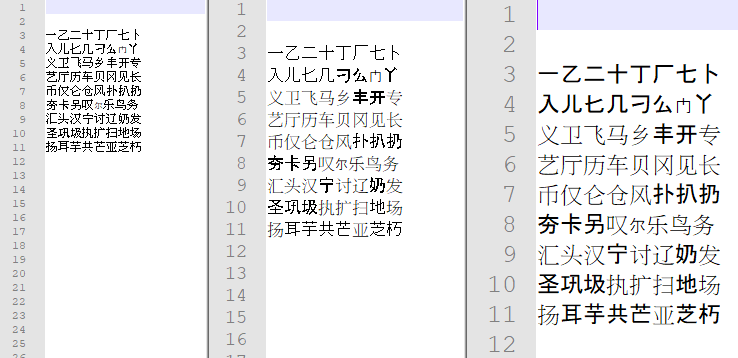
There seems to be a font rendering issue for CJK characters, using the default settings, they are rendered using a different set of fonts, instead of a single one. Not sure how the font selection operates under Windows, but the issue isn't reproducible under Microsoft's notepad. Is there supposed to be a way to select or force a specific font for rendering?
Notepad++ v7.8.5 (64-bit)
OS Name : Windows 10 Enterprise LTSC 2019 (64-bit)
OS Version : 1809
OS Build : 17763.1192
Attached is my system font list (relevant ones are Google Noto CJK, Adobe Source Han and GNU Unifont along with the defaults Microsoft CJK) and a screenshot at several font sizes.
Contributor guide
First steps
- Read the whole issue, then the project's contributing guide.
- Comment on the issue to say you are picking it up — it saves two people doing the same work.
- Fork the repository and make your change on a branch.
- Open a pull request that references the issue number.
Research direction
Start by reproducing the CJK rendering behavior on Windows 10 using the reported Notepad++ version, installed font list, and screenshot. Then trace the editor's font selection and rendering entry points; done means the cause is identified and the expected behavior or a way to force one font is established with a verified result.
Written by the indexing model from the issue text.
Assessment
- Tech stack
- cpp
- Domain
- desktop, internationalization
- Issue type
- Bug
- Difficulty
- 4/5
- Estimated time
- 3-5 days
- Activity status
- Stale
- Clarity
- Needs clarification
- Newbie friendliness
- 35/100