notepad-plus-plus / notepad-plus-plus/notepad-plus-plus
AutoCompletion Overloads - Allow up/down keys to navigate between overloads
Nobody has claimed this yet.
- Dominant language
- C++
- Stars
- 29.4k
- Forks
- 5.4k
- PR merge metrics
- No merged PRs in 30d
Description
Description of the Issue
When typing out a function in Notepad++ using a custom language definition. The function has a number of parameter overloads. I currently have to use my mouse to manually navigate between each parameter overloads by pressing on the small up/down arrows
Expected Behavior
I expected to be able to use Up / Down key to navigate between each overload
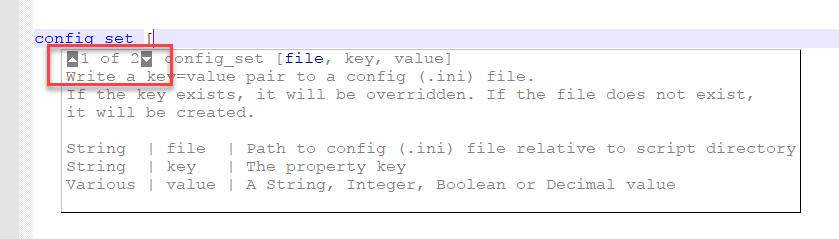
Actual Behavior
The cursor went down one line when I press Down
Contributor guide
First steps
- Read the whole issue, then the project's contributing guide.
- Comment on the issue to say you are picking it up — it saves two people doing the same work.
- Fork the repository and make your change on a branch.
- Open a pull request that references the issue number.
Research direction
Start by reproducing the AutoCompletion overload behavior in Notepad++ with a custom language definition and multiple parameter overloads. Trace the overload popup's up/down navigation and keyboard handling. Done means Up and Down select adjacent overloads without moving the editor cursor, while the existing mouse arrows continue to work.
Written by the indexing model from the issue text.
Assessment
- Tech stack
- cpp
- Domain
- desktop
- Issue type
- Feature
- Difficulty
- 4/5
- Estimated time
- 3-5 days
- Activity status
- Stale
- Clarity
- Mostly clear
- Newbie friendliness
- 42/100