notepad-plus-plus / notepad-plus-plus/notepad-plus-plus
Wrong lexing after deleting a line
Nobody has claimed this yet.
- Dominant language
- C++
- Stars
- 29.4k
- Forks
- 5.4k
- PR merge metrics
- No merged PRs in 30d
Description
STR:
Paste the following code into a new document and set the language to CSS.
:root
{
	--toolbarbutton-inner-padding: 6px !important;
	--arrowpanel-border-radius: 0px !important;
	--panel-border-radius: 0px !important;
}

.tab-context-line { height: 30px !important;  flex: 1 !important; }
Delete line 5.
Result:
Line 7 is not styled properly.
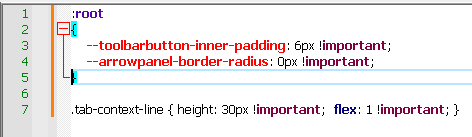
Switching to another tab and back, fixes the issue.
Notepad++ v8.4.8 (64-bit)
Build time : Jan 20 2023 - 14:41:09
Path : C:---notepad++.exe
Command Line :
Admin mode : ON
Local Conf mode : ON
Cloud Config : OFF
OS Name : Windows 10 Pro (64-bit)
OS Version : 20H2
OS Build : 19042.985
Current ANSI codepage : 1255
Plugins :
ComparePlus (1.1)
HTMLTag (1.3.6)
MenuIcons (2.0.2)
PythonScript (2)
_CustomizeToolbar (4.2)
Contributor guide
First steps
- Read the whole issue, then the project's contributing guide.
- Comment on the issue to say you are picking it up — it saves two people doing the same work.
- Fork the repository and make your change on a branch.
- Open a pull request that references the issue number.
Research direction
Start by reproducing the issue in Notepad++ v8.4.8 with the provided CSS snippet: delete line 5 and inspect line 7 before and after switching tabs. Trace the CSS lexing or styling refresh triggered by line deletion; done means line 7 is styled correctly immediately without leaving and returning to the tab.
Written by the indexing model from the issue text.
Assessment
- Tech stack
- cpp, css
- Domain
- desktop-dev, tooling
- Issue type
- Bug
- Difficulty
- 3/5
- Estimated time
- 1-2 days
- Activity status
- Stale
- Clarity
- Mostly clear
- Newbie friendliness
- 45/100