notepad-plus-plus / notepad-plus-plus/notepad-plus-plus
Caret disappears after EOL Conversion
Nobody has claimed this yet.
- Dominant language
- C++
- Stars
- 29.4k
- Forks
- 5.4k
- PR merge metrics
- No merged PRs in 30d
Description
STR:
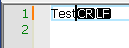
Place the caret at the end of line 1.
Convert EOL to Unix.
Undo.
Result:
The caret disappears (positioned between CR to LF).
Related:
https://github.com/notepad-plus-plus/notepad-plus-plus/issues/12472.
Notepad++ v8.4.8 (64-bit)
Build time : Dec 30 2022 - 15:29:34
Path : C:---\notepad++.exe
Command Line :
Admin mode : ON
Local Conf mode : ON
Cloud Config : OFF
OS Name : Windows 10 Pro (64-bit)
OS Version : 20H2
OS Build : 19042.985
Current ANSI codepage : 1255
Plugins :
ComparePlus (1.1)
HTMLTag (1.3.6)
MenuIcons (2.0.1)
PythonScript (2)
_CustomizeToolbar (4.2)
Contributor guide
First steps
- Read the whole issue, then the project's contributing guide.
- Comment on the issue to say you are picking it up — it saves two people doing the same work.
- Fork the repository and make your change on a branch.
- Open a pull request that references the issue number.
Research direction
Reproduce the issue using the listed steps: place the caret at the end of line 1, convert EOL to Unix, then undo. Trace the EOL conversion and undo behavior responsible for caret placement. Done means undo restores the caret to a visible, valid position rather than between CR and LF.
Written by the indexing model from the issue text.
Assessment
- Tech stack
- cpp
- Domain
- desktop
- Issue type
- Bug
- Difficulty
- 3/5
- Estimated time
- 1-2 days
- Activity status
- Stale
- Clarity
- Mostly clear
- Newbie friendliness
- 42/100