notepad-plus-plus / notepad-plus-plus/notepad-plus-plus
Column mode selection and operation when "Text Direction RTL"
Open
Nobody has claimed this yet.
- Dominant language
- C++
- Stars
- 29.4k
- Forks
- 5.4k
- PR merge metrics
- No merged PRs in 30d
Description
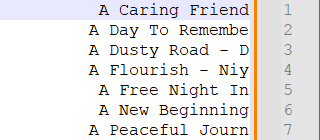
I tried to copy the last 15 characters at the end of each line (file name).
So I use the "Text Direction RTL " and select column I needed.
It shows like this and then I make a copy

After I paste it, this is what I really "COPY".
Contributor guide
First steps
- Read the whole issue, then the project's contributing guide.
- Comment on the issue to say you are picking it up — it saves two people doing the same work.
- Fork the repository and make your change on a branch.
- Open a pull request that references the issue number.
Research direction
Start by reproducing the reported case in Notepad++: enable "Text Direction RTL", select the last 15 characters of each line in column mode, copy, and paste the result. Compare the selection and pasted text with the screenshots; done means the copied column contains the characters visibly selected from each line.
Written by the indexing model from the issue text.
Assessment
- Tech stack
- cpp
- Domain
- desktop
- Issue type
- Bug
- Difficulty
- 4/5
- Estimated time
- 3-5 days
- Activity status
- Stale
- Clarity
- Mostly clear
- Newbie friendliness
- 35/100