notepad-plus-plus / notepad-plus-plus/notepad-plus-plus
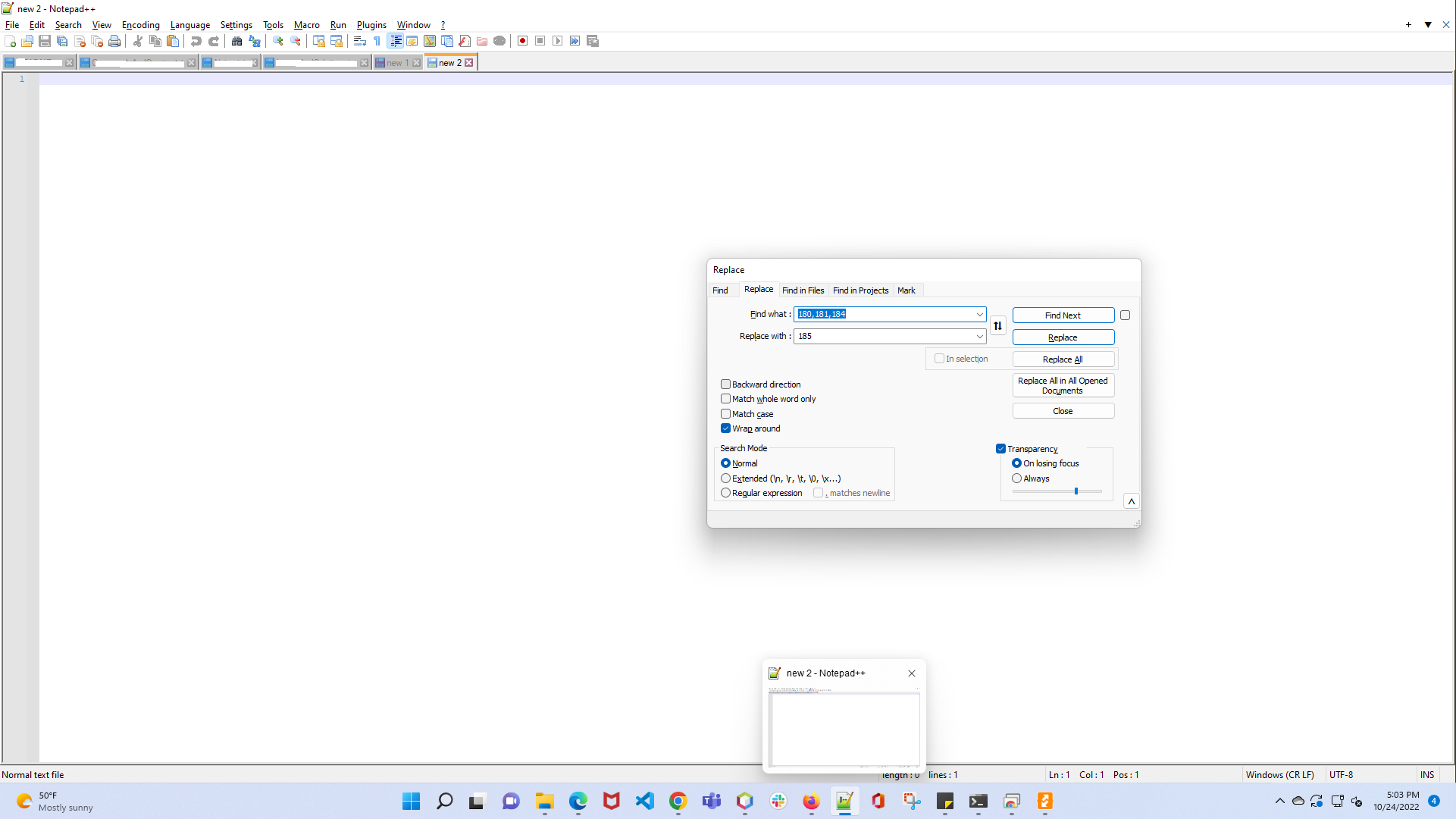
Mouse over on Notepad++ on status bar shows "Replace" model
Nobody has claimed this yet.
- Dominant language
- C++
- Stars
- 29.4k
- Forks
- 5.4k
- PR merge metrics
- No merged PRs in 30d
Description
Description of the Issue
When we are working on some other application, and when we mouse over on the Notepad++ icon on the status bar and then over the small notepad preview window, it shows the previous "Replace" model which I used (and closed as well) instead of just the new document.
Steps to Reproduce the Issue
- Open Notepad++
- Open a existing document.
- Use the "Replace" model and make some replacements in the document.
- Close the "Replace" model.
- Go to some other application.
- Now, place the mouse over the Notepad++ icon, and then over the small preview window.
- It shows the "Replace" model which I used previously, instead of only the document currently open.
Expected Behavior
Shows only the current document open in Notepad++
Actual Behavior
Shows the "Replace" model on top of the currently open document.
Debug Information
Notepad++ v8.4.5 (64-bit)
Build time : Sep 3 2022 - 04:05:32
Path : C:\Program Files\Notepad++\notepad++.exe
Command Line : "C:\JaiThilak\DigitalGatewayContentCentral\Tickets\CS-3985\TargetId.txt"
Admin mode : OFF
Local Conf mode : OFF
Cloud Config : OFF
OS Name : Windows 11 (64-bit)
OS Version : 21H2
OS Build : 22000.1098
Current ANSI codepage : 1252
Plugins :
mimeTools (2.8)
NppConverter (4.4)
NppExport (0.4)
Contributor guide
First steps
- Read the whole issue, then the project's contributing guide.
- Comment on the issue to say you are picking it up — it saves two people doing the same work.
- Fork the repository and make your change on a branch.
- Open a pull request that references the issue number.
Research direction
Reproduce the issue with the listed steps on Windows 11, especially the taskbar thumbnail after closing the Replace dialog. Then locate the taskbar preview handling in the repository and verify that the preview shows only the currently open document, including after the Replace dialog has been closed.
Written by the indexing model from the issue text.
Assessment
- Tech stack
- cpp
- Domain
- desktop
- Issue type
- Bug
- Difficulty
- 4/5
- Estimated time
- 3-5 days
- Activity status
- Stale
- Clarity
- Mostly clear
- Newbie friendliness
- 35/100