notepad-plus-plus / notepad-plus-plus/notepad-plus-plus
Re-search from Search Results window
Nobody has claimed this yet.
- Dominant language
- C++
- Stars
- 29.4k
- Forks
- 5.4k
- PR merge metrics
- No merged PRs in 30d
Description
Description of the Issue
After performing a search that outputs to the Search Results window, it would be nice to have on the right click menu an option to "re-run" the same search, getting the search text from the heading line in the Search Results window - "find" in the example doctored screenshot below.
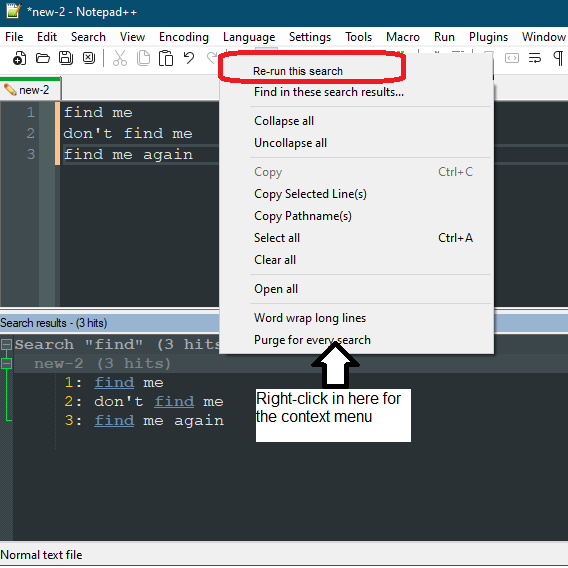
The use case is I search for an item, use the search results window to locate each one and update / replace it with something and then want to run the search again to make sure the "changes" are "cleared out" - i.e., not found - in the new "re"-search results.
Debug Information
Notepad++ v8.3.1 (64-bit)
Build time : Feb 16 2022 - 22:55:56
Path : C:\usr\bin\npp64\notepad++.exe
Command Line :
Admin mode : OFF
Local Conf mode : ON
Cloud Config : OFF
OS Name : Windows 10 Enterprise (64-bit)
OS Version : 2009
OS Build : 19042.1526
Current ANSI codepage : 1252
Plugins :
Contributor guide
First steps
- Read the whole issue, then the project's contributing guide.
- Comment on the issue to say you are picking it up — it saves two people doing the same work.
- Fork the repository and make your change on a branch.
- Open a pull request that references the issue number.
Research direction
Start from the Search Results window and its right-click menu, using the issue description and screenshot as the behavioral reference. Trace how the displayed search heading is stored or interpreted; done means a menu option reruns that search and produces refreshed results after edits.
Written by the indexing model from the issue text.
Assessment
- Tech stack
- cpp
- Domain
- desktop
- Issue type
- Feature
- Difficulty
- 4/5
- Estimated time
- 3-5 days
- Activity status
- Stale
- Clarity
- Mostly clear
- Newbie friendliness
- 35/100