notepad-plus-plus / notepad-plus-plus/notepad-plus-plus
Allow blanks as a filter criteria in the find in files dialogue
Nobody has claimed this yet.
- Dominant language
- C++
- Stars
- 29.4k
- Forks
- 5.4k
- PR merge metrics
- No merged PRs in 30d
Description
Description of the Issue
While currently blanks are being used as a seperator for multiple filter criteria the "Find in Files" filter field, it's not possible to explicitly use blanks as a filter criteria for file names. Using blanks as a filter criteria should be possible if either the filter was defined as a multi-string input field (like e.g. Multi_SZ registry values in Windows can be edited) - OR - the use of double colons was allowed to mask filename filters containing blanks (while double colons " aren't allowed as file / directory name characters in Windows / UNIX file systems and using those to mask file names is common practice)
The original issue was described in the Notepad++ community forum already:
https://community.notepad-plus-plus.org/topic/22487/bug-in-find-in-files-filter-of-notepad-8-2-1-x64/7
Steps to Reproduce the Issue
Have a directory containing files with blanks in the filename. In my example there were
SAP 7.60*.XML
- and -
SAP 7.70*.XML
files contained in the search directory folder "C:\UEMConfig\T\general\FlexRepository\Shortcut".
When I used
SAP 7.70*.xml
as a "Find in Files" filter, I had 0 hits:
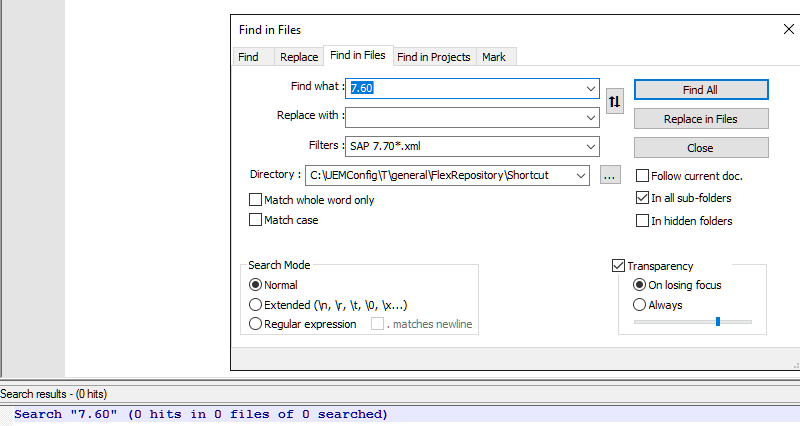
The search results in 0 files found…
Search “7.60” (0 hits in 0 files of 0 searched)
When I instead then search for SAP*.xml it properly finds files:
Search “7.60” (13 hits in 12 files of 13 searched)
but in this case unfortunately the hits also contains results from SAP 7.60*.xml (which should not be part of the replacement result set, it was only used to show that the files exist).
C:\UEMConfig\T\general\FlexRepository\Shortcut\SAP 7.60 Netweaver - SAPLogon.xml (1 hit)
C:\UEMConfig\T\general\FlexRepository\Shortcut\SAP 7.70 Netweaver - Analysis for Microsoft Excel.xml (1 hit)
What I originally wanted to do is replace 7.60 by 7.70 in all SAP 7.70*.xml files, which is impossible with the current Notepad++ version's filter
Also using "SAP 7.70*.XML" returned no hits.

The official workaround to use SAP?7.70*.XML is not exactly matching, while this would also allow replacement in SAP-7.70*.xml files (if those existed). ? is a single character wildcard, therefore not one-to-one (unique).
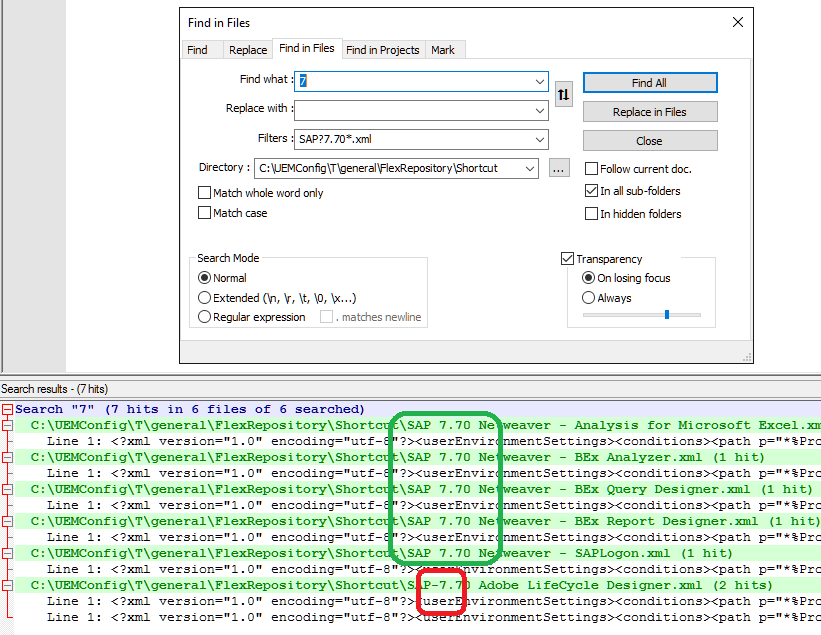
Expected Behavior
allow explicit searching for files containing blanks in the file name in the "find in files" filter dialogue
Actual Behavior
the filter uses blanks as a separator for multiple search criteria
SAP 7.70*.xml
is interpreted as a search for
SAP
-and-
7.70*.XML
files,
"SAP 7.70*.xml"
is interpreted wrongly.
Debug Information
Notepad++ v8.3 (64-bit)
Build time : Feb 3 2022 - 03:39:05
Path : C:\Admin\Tools\Notepad++x64\notepad++.exe
Command Line :
Admin mode : OFF
Local Conf mode : OFF
Cloud Config : OFF
OS Name : Windows Server 2016 Standard (64-bit)
OS Version : 1607
OS Build : 14393.4889
Current ANSI codepage : 1252
Plugins : ComparePlugin.dll DSpellCheck.dll mimeTools.dll NppConverter.dll NppExport.dll NppFavorites.dll NppFTP.dll NppSaveAsAdmin.dll RunMe.dll XMLTools.dll
Contributor guide
First steps
- Read the whole issue, then the project's contributing guide.
- Comment on the issue to say you are picking it up — it saves two people doing the same work.
- Fork the repository and make your change on a branch.
- Open a pull request that references the issue number.
Research direction
Start at the Find in Files filter dialogue and review the linked community-forum report for the existing space-separated parsing behavior. Compare the SAP 7.70*.xml examples with the quoted and wildcard forms; done means a filter can explicitly match filenames containing spaces without also matching unrelated filenames.
Written by the indexing model from the issue text.
Assessment
- Tech stack
- cpp
- Domain
- desktop, search
- Issue type
- Feature
- Difficulty
- 5/5
- Estimated time
- Over a week
- Activity status
- Stale
- Clarity
- Mostly clear
- Newbie friendliness
- 35/100