notepad-plus-plus / notepad-plus-plus/notepad-plus-plus
Checking or unchecking "Use default value" for tab settings doesn't immediately take effect
Nobody has claimed this yet.
- Dominant language
- C++
- Stars
- 29.4k
- Forks
- 5.4k
- PR merge metrics
- No merged PRs in 30d
Description
Description of the Issue
I sometimes switch between editing C/C++ files with a project's conventional 2 or 3 space indent and my preferred size-4 tab character indent. As such, I have a size-4 with tabs for the [Default] value, and often have size-2 with spaces for c. However, when checking or unchecking the "use default value" setting, the tab size in open documents isn't changed, affecting both rendering and inserting new tabs. The size only properly updates after editing the [Default] value (e.g. clicking "replace by space" twice or clicking the tab size text and pressing enter immediately) or after restarting notepad++.
Steps to Reproduce the Issue
- Open a C file with some tab characters in it. (Tab characters instead of spaces makes it easier to see the issue, since they will change or not change in the background while the preferences window is opened, but the issue doesn't strictly require them (you'll need to switch to the document and press the tab key otherwise).)
- Open preferences and go to the languages tab.
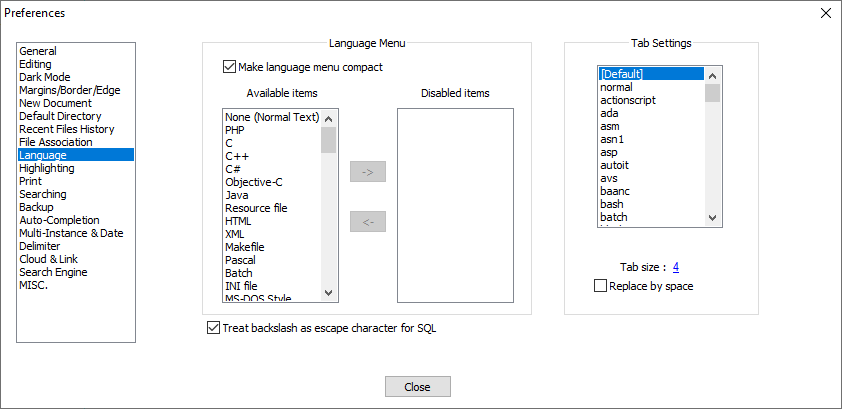
- Select
c:
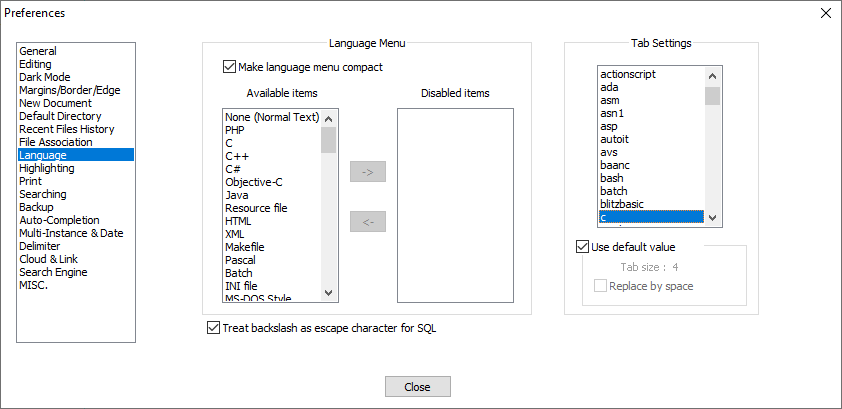
- Uncheck "use default value" (if it was already unchecked, nothing new needs to be done). Nothing should change, as the default value was also present in the disabled label and check box.
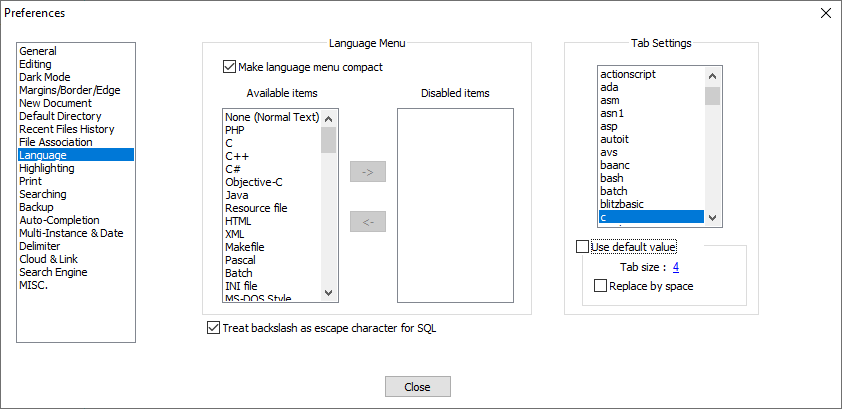
- Change the tab size to a value different from the default. The document should update in the background to use the new size (or you can switch to it and press the tab key if you're using spaces.)
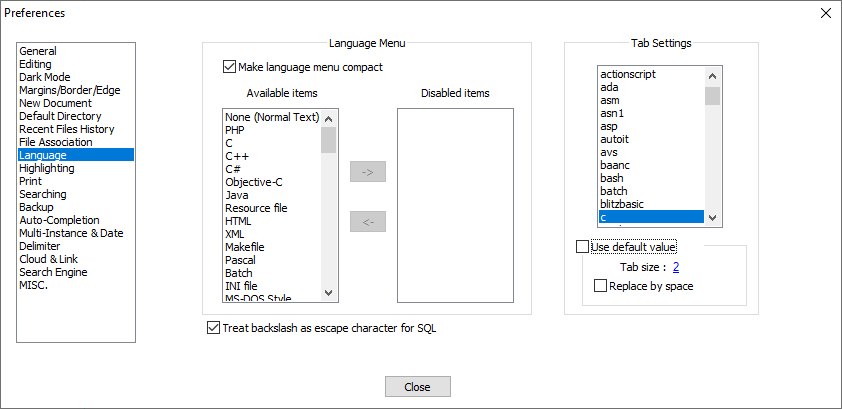
- Check "use default value". The document in the background will not update to the default size, but will instead use the manually entered value even though "use default value" is unchecked (and pressing the tab key will still use the manually entered value as well.)
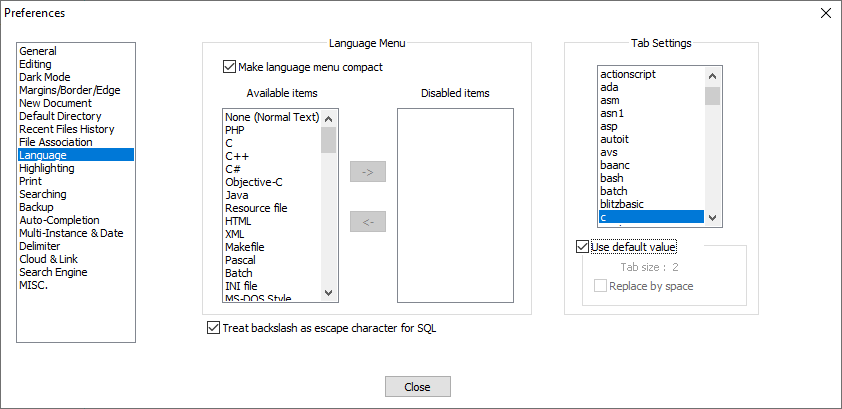
- Go back to
[Default], and edit the tab size. Even if the new value matches the existing value, the document will update to the default size.
Additional oddities
Each one of these might be its own bug, but I suspect they're all related to the same issue or point further to the cause of this issue so I'm including them here:
- When you first check "use default value" in step 6, the check box and label become disabled, but they still display the manually entered values. However, unchecking "use default value" causes the check box and label to be populated by the default values (still without updating the document in the background.) Checking "use default value" again causes the manually entered values to be displayed again (with the check box and label disabled).
- When you first check "use default value" in step 6, the check box and label become disabled, but they still display the manually entered values. However, selecting a different language and then selecting
c(or even clicking oncwithout changing to a different language) causes them to be populated by the default value. In this case, it always stays at the default value. - When "use default value" is unchecked, entering a different value for tab size and then clicking on tab size again has the pop-up dialog filled with the default value instead of the manually entered value (so clicking on it and then pressing enter causes the default value to be used, instead of making no changes). This doesn't apply to
[Default]. This also may be intended behavior. - Restarting notepad++ works the same as editing
[Default]in step 7. However, since the other tab settings take effect immediately, restarting notepad++ shouldn't be needed. (I suspect this is what happened in #9869, but I'm not entirely sure; this whole behavior is fairly confusing.)
Debug Information
Notepad++ v8.1.5   (32-bit)
Build time : Sep 26 2021 - 15:15:32
Path : C:\Program Files (x86)\Notepad++\notepad++.exe
Command Line :
Admin mode : OFF
Local Conf mode : OFF
Cloud Config : OFF
OS Name : Windows 10 Home (64-bit)
OS Version : 2009
OS Build : 19042.1288
Current ANSI codepage : 1252
Plugins : DSpellCheck.dll mimeTools.dll NppConverter.dll NppExport.dll
Contributor guide
First steps
- Read the whole issue, then the project's contributing guide.
- Comment on the issue to say you are picking it up — it saves two people doing the same work.
- Fork the repository and make your change on a branch.
- Open a pull request that references the issue number.
Research direction
Reproduce the issue in the Preferences Languages tab with a C/C++ document, following the listed steps for switching the "Use default value" setting. Trace how tab settings are applied when the setting is checked or unchecked; done means open documents immediately use the selected default or language-specific tab size for rendering and inserted tabs without editing another setting or restarting.
Written by the indexing model from the issue text.
Assessment
- Tech stack
- cpp
- Domain
- desktop
- Issue type
- Bug
- Difficulty
- 4/5
- Estimated time
- 3-5 days
- Activity status
- Stale
- Clarity
- Mostly clear
- Newbie friendliness
- 45/100