notepad-plus-plus / notepad-plus-plus/notepad-plus-plus
Search problem "Find in Files"
Nobody has claimed this yet.
- Dominant language
- C++
- Stars
- 29.4k
- Forks
- 5.4k
- PR merge metrics
- No merged PRs in 30d
Description
Description of the Issue
When searching "Find in Files ..." some files are opened in Macintosh encoding instead of Windows-1251 and the distorted piece of text is not found.
Steps to Reproduce the Issue
Unpack the attached file bug_find_sample.zip
The Find_in_Files folder contains five files with the same text (file01.sql - file05.sql).
Windows-1251 file encoding.
In the settings enable "Autodetect character encoding"
Menu "Settings" -> "Preferences…", "MISC."

Open the file file01.sql. The file opened in Macintosh encoding instead of Windows-1251. The selected part of the text is distorted:
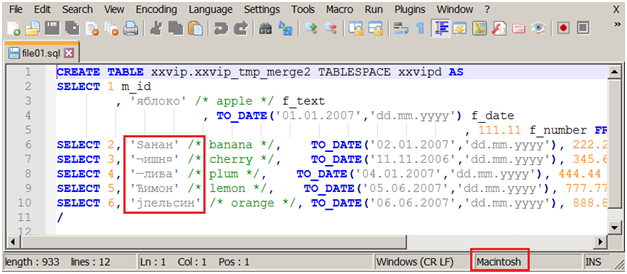
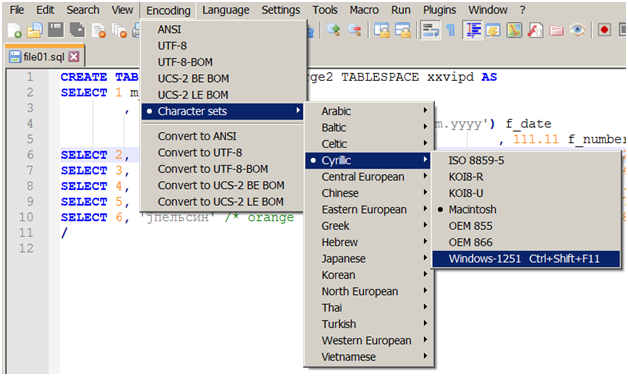
Switch encoding to Windows-1251.
Menu "Encoding" -> "Character sets" -> "Cyrillic" -> "Windows-1251"
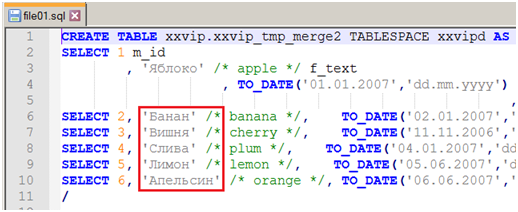
The correct text looks like this:
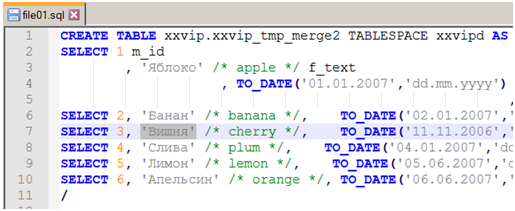
Highlight word
Press Ctrl+C (copy to Windows clipboard).
Close the file.
Menu "Search" -> "Find in Files…"
In the field "Find what" paste Ctrl+V from the Windows clipboard.
"Filters" = *.*
"Directory" = select folder Find_in_Files
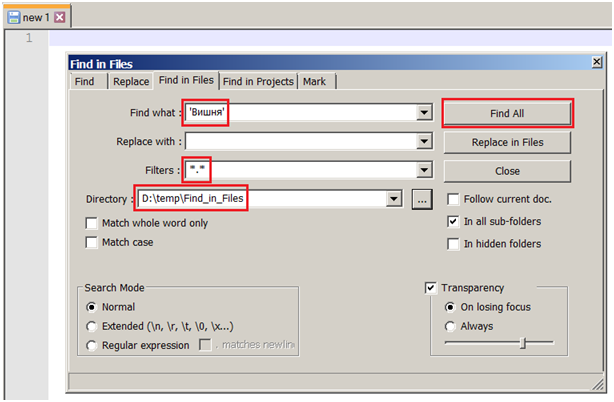
Press the button "Find All"
Actual Behavior
Invalid result received:
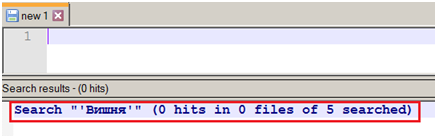
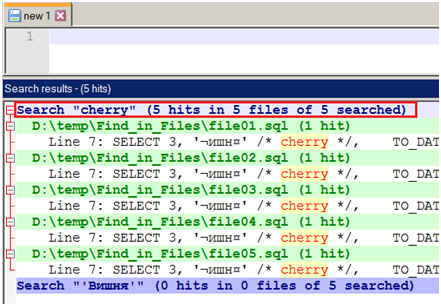
Expected Behavior
If you search for the "cherry" word, the result is correct:
Additional Information
The problem of searching in files, apparently, arises due to the fact that some files are opened in the wrong encoding, so the distorted piece of text is not found.
Instead of Windows-1251 (or ISO 8859-5) encoding, the encoding is sometimes incorrectly identified as Macintosh (or TIS-620, ISO 8859-7, ISO 8859-8).
This happens when opening files with program code where, possibly due to the small number of characters in the local encoding, there is a high probability of the "Autodetect character encoding" error.
Also for xml files with the header:
<? xml version = "1.0" encoding = 'windows-1251'?>
sometimes Macintosh encoding is detected.
The xml files with the header:
<? xml version = '1.0' encoding = 'UTF-8'?>
ANSI encoding is determined when there are no local encoding characters.
(Maybe for XML files look at the encoding = 'xxx' tag in the header?)
I cannot turn off the "Autodetect character encoding" feature.
I am forced to use the encodings my customer is using:
Windows-1251
UTF-8
ISO 8859-5
Very rarely used by OEM 866
No other encodings are used.
Besides searching through files, there is another related issue.
As a result of incorrect "Autodetect character encoding", the text of files sometimes gets corrupted.
Macintosh encoding is not correctly detected when opening a file.
You do not always notice this, rare fragments of local encoding characters are distorted.
You insert a new block of text, it is automatically converted to Macintosh encoding.
The inserted text looks correct on the screen, save the file.
As a result, a part of the text of the file in the Windows-1251 encoding was corrupted when opened and the new part of the text was saved in the incorrect encoding of the Macintosh.
It is difficult to fix such a file.
The error can be detected after a long time or even when starting a finished program.
Suggestion how to solve the problem
Allow the user to disable unnecessary encodings of the "Autodetect character encoding" algorithm.
If the number of characters of the local encoding in the text of the file is small, the "Autodetect character encoding" problem is most likely not 100% solved.
It is impossible to accurately determine the encoding from several characters when there are two or more suitable encodings according to the "Autodetect character encoding" algorithm.
For example, wrong encoding TIS-620:

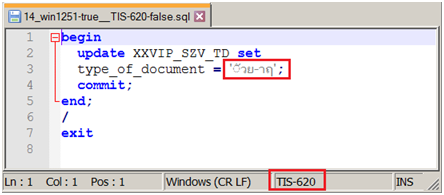
Correct encoding Windows-1251:
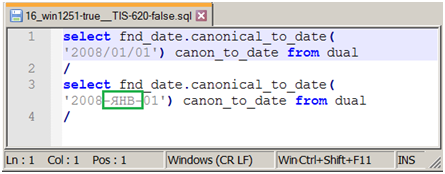

Allowing the user to specify a list of their own encodings for "Autodetect character encoding" will solve the problem.
Instead of the check-box "Autodetect character encoding" (Off / On):
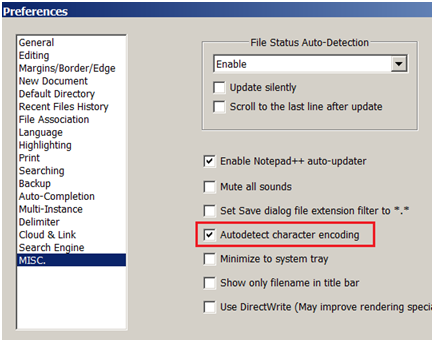
A third choice can be added
«Autodetect character encoding»:
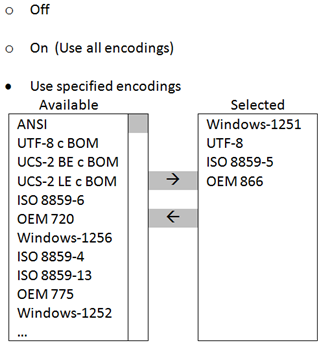
And the "Autodetect character encoding" algorithm will use only those encodings that have been specified by the user.
Additionally, you can remember the encoding set by the user, together with the path\filename in the history of the last opened files. And the next time you open the file, automatically set the saved encoding.
In the attached file bug_find_sample.zip there is a folder "Win1251-true_Macintosh-false" with examples of the "Autodetect character encoding" problem. All files here have Windows-1251 encoding, but they open in Macintosh encoding.
The folder "other encoding false" contains examples of files with different other encodings.
Debug Information
Windows 10
Notepad++ v7.9.5 (32-bit)
Build time : Mar 21 2021 - 02:09:07
Path : C:\Program Files (x86)\Notepad++\notepad++.exe
Admin mode : OFF
Local Conf mode : OFF
OS Name : Windows 10 Enterprise 2016 LTSB (64-bit)
OS Version : 1607
OS Build : 14393.4530
Current ANSI codepage : 1251
Plugins : ComparePlugin.dll DSpellCheck.dll mimeTools.dll NppConverter.dll NppExport.dll
Windows 7
Notepad++ v7.9.5 (32-bit)
Build time : Mar 21 2021 - 02:09:07
Path : C:\Program Files (x86)\Notepad++\notepad++.exe
Admin mode : OFF
Local Conf mode : OFF
OS Name : Windows 7 Professional (64-bit)
OS Build : 7601.0
Current ANSI codepage : 1251
Plugins : ComparePlugin.dll DSpellCheck.dll mimeTools.dll NppConverter.dll NppExport.dll
Contributor guide
First steps
- Read the whole issue, then the project's contributing guide.
- Comment on the issue to say you are picking it up — it saves two people doing the same work.
- Fork the repository and make your change on a branch.
- Open a pull request that references the issue number.
Research direction
Start by reproducing the encoding-detection failure with the attached bug_find_sample.zip, especially through Search → Find in Files and the Autodetect character encoding setting. The report names no source files or tests, so trace the encoding detection and file-search entry points before deciding scope. Done should mean Windows-1251 text is detected and searched correctly without corruption, with the requested encoding restrictions clarified.
Written by the indexing model from the issue text.
Assessment
- Tech stack
- cpp
- Domain
- desktop-dev, localization, search
- Issue type
- Bug
- Difficulty
- 5/5
- Estimated time
- Over a week
- Activity status
- Stale
- Clarity
- Mostly clear
- Newbie friendliness
- 25/100