macOS Catalina install instructions didn't work for me (running Big Sur now)
Nobody has claimed this yet.
- Dominant language
- Python
- Stars
- 10.7k
- Forks
- 1.9k
- Avg merge
- 1d 4h
- Merged PRs (30d)
- 5
Description
- Node Version:
❯ node -v
v14.16.1
❯ npm -v
7.11.2
- Platform:
MBP 20.4.0 Darwin Kernel Version 20.4.0: Thu Apr 22 21:46:47 PDT 2021; root:xnu-7195.101.2~1/RELEASE_X86_64 x86_64

❯ sw_vers
ProductName:	macOS
ProductVersion:	11.3.1
BuildVersion:	20E241
- Compiler:
❯ cc -v
xcrun: error: active developer path ("/Applications/Xcode.app/Contents/Developer") does not exist
Use `sudo xcode-select --switch path/to/Xcode.app` to specify the Xcode that you wish to use for command line developer tools, or use `xcode-select --install` to install the standalone command line developer tools.
See `man xcode-select` for more details.
- Module: N/A
After getting a bunch of node-gyp errors trying to install a private git repo based on Next.js, I figured that node-gyp must be having version conflicts, so I decided to update to the latest version of macOS (Big Sur 11.3.1).
I didn't see anything about Big Sur in this repo, so I crossed my fingers and followed the instructions for Catalina, top-down - all of them failed the acid test until I got to "I did all that and the acid test still does not pass".
❯ curl -sL https://github.com/nodejs/node-gyp/raw/master/macOS_Catalina_acid_test.sh | bash
Command Line Tools version: 12.5.0.0.1.1617976050
Great, but now:
❯ git
xcrun: error: active developer path ("/Applications/Xcode.app/Contents/Developer") does not exist
Use `sudo xcode-select --switch path/to/Xcode.app` to specify the Xcode that you wish to use for command line developer tools, or use `xcode-select --install` to install the standalone command line developer tools.
See `man xcode-select` for more details.
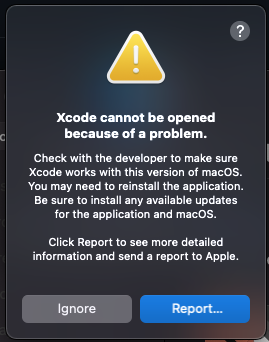
Additionally, I can no longer open Xcode:
Contributor guide
First steps
- Read the whole issue, then the project's contributing guide.
- Comment on the issue to say you are picking it up — it saves two people doing the same work.
- Fork the repository and make your change on a branch.
- Open a pull request that references the issue number.
Research direction
Read macOS_Catalina.md and the referenced macOS_Catalina_acid_test.sh, then compare their instructions with the reported Big Sur output from xcode-select, git, and the command-line tools version check. Update the documentation if the reported setup is no longer covered, and verify that the acid test and related commands describe a working path.
Written by the indexing model from the issue text.
Assessment
- Tech stack
- macos, nodejs
- Domain
- documentation
- Issue type
- Documentation
- Difficulty
- 2/5
- Estimated time
- 1-3 hours
- Activity status
- Stale
- Clarity
- Mostly clear
- Newbie friendliness
- 35/100