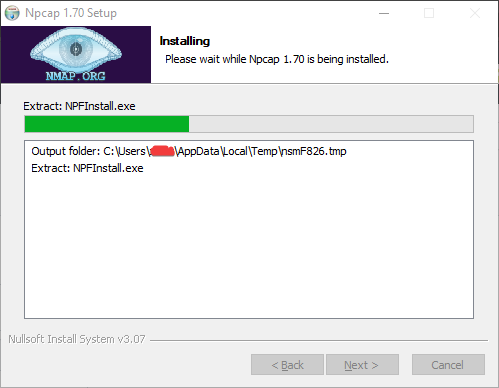
1.70 Installer hangs at "Extract: NPFInstall.exe"
Nobody has claimed this yet.
- Dominant language
- C
- Stars
- 3.6k
- Forks
- 592
- PR merge metrics
- No merged PRs in 30d
Description
Describe the bug
When trying to install npcap 1.70, the installer hangs at Extract: NPFInstall.exe. At the time of writing, it's been stuck here for over 2 hours.
To Reproduce
Steps to reproduce the behavior:
- Run the installer
- click through the options - the choice of options appears to not matter.
- Observe that the installer hangs at "Extract: NPFInstall.exe"
Expected behavior
The install to complete without error
Screenshots
If applicable, add screenshots to help explain your problem.
Screenshot of installer window
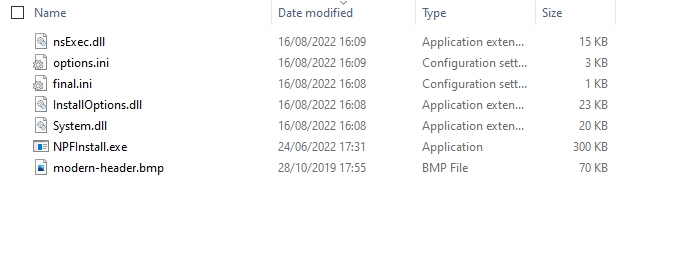
Screeenshot of files in temp directory
Diagnostic information
- Windows 10 Enterprise 20H2 Build 19042.1826
- [Installation logs]
Here are the last few lines:
New install of "Npcap 1.70" to "C:\Program Files\Npcap"
Section: "WinPcap"
CreateDirectory: "C:\Users\username\AppData\Local\Temp\nsmF826.tmp" (1)
File: overwriteflag=0, allowskipfilesflag=2, name="NPFInstall.exe"
File: wrote 307192 to "C:\Users\username\AppData\Local\Temp\nsmF826.tmp\NPFInstall.exe"
Call: 1200
Call: 1923
SetFlag: 13=6
File: overwriteflag=1, allowskipfilesflag=0, name="C:\Users\username\AppData\Local\Temp\nsmF826.tmp\nsExec.dll"
File: wrote 14544 to "C:\Users\username\AppData\Local\Temp\nsmF826.tmp\nsExec.dll"
Full install log here: install.log
Additional context
Since nsExec.dll exists, presumably it's actually the next step of the install process that is getting stuck. I also tried installing it on another machine and can see that the next line in the install log was "no processes using Npcap". I downloaded the source for extra clues but couldn't find the install script for the nullsoft installer so I can't tell what method its using to check the processes.
If you can advise where to find the install script or what it's trying to do I can debug further.
It's an enterprise-managed machine so I wouldn't be surprised if its some permissions or group policy thing.
Contributor guide
No contributing guide indexed for this repository
First steps
- Read the whole issue, then the project's contributing guide.
- Comment on the issue to say you are picking it up — it saves two people doing the same work.
- Fork the repository and make your change on a branch.
- Open a pull request that references the issue number.
Research direction
Start with the attached install.log and the installer step after NPFInstall.exe and nsExec.dll are written to the temporary directory. Compare the reported hang with the successful install's next log line, "no processes using Npcap," and determine what prevents installation from completing on the stated Windows environment.
Written by the indexing model from the issue text.
Assessment
- Domain
- operating-systems
- Issue type
- Bug
- Difficulty
- 4/5
- Estimated time
- 3-5 days
- Activity status
- Stale
- Clarity
- Needs clarification
- Newbie friendliness
- 30/100