Getting "Failed to create the npf service" error while installing npcap
Nobody has claimed this yet.
- Dominant language
- C
- Stars
- 3.6k
- Forks
- 592
- PR merge metrics
- No merged PRs in 30d
Description
Hi Team,
Getting error "Failed to create the npcap service for Win7, Win8 and Win10. Please try installing Npcap again, or use the latest official Npcap installer from https://nmap.org/npcap/" while installing npcap. tried with all the versions of npcap. I am attaching the setupapi.dev.log file from C:\Windows\INF along with the screenshot. Kindly check the issue.
Done below workarounds from my side.
- uninstalled nmap and npcap from programs,registries,appdata temp files and tried with all the versions.
- deleted the dll files packet.dll,wpcap.dll and npcap folder from C:\Windows\SysWOW64 and C:\Windows\System32 locations and then installed.
- Deleted from this location C:\Windows\System32\DriverStore\FileRepository and tried
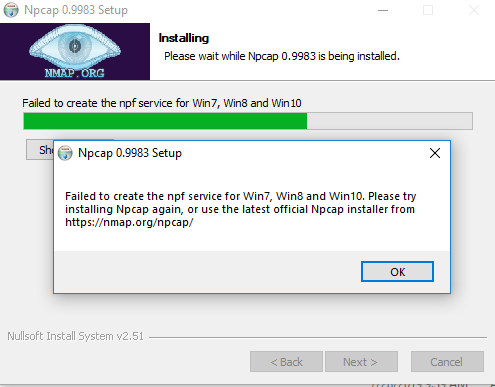
Please check and suggest me.
Contributor guide
No contributing guide indexed for this repository
First steps
- Read the whole issue, then the project's contributing guide.
- Comment on the issue to say you are picking it up — it saves two people doing the same work.
- Fork the repository and make your change on a branch.
- Open a pull request that references the issue number.
Research direction
Start with the attached setupapi.dev.log and screenshot, then inspect the Npcap installation path for the reported Windows versions and try to reproduce the service-creation failure. Done means identifying the installation cause and documenting a verified fix or the additional diagnostics needed.
Written by the indexing model from the issue text.
Assessment
- Tech stack
- c
- Domain
- networking, operating-systems
- Issue type
- Bug
- Difficulty
- 4/5
- Estimated time
- 3-5 days
- Activity status
- Stale
- Clarity
- Needs clarification
- Newbie friendliness
- 25/100