Unclear NI-SCOPE Python API 'Simulate' Attribute Documentation
Nobody has claimed this yet.
- Dominant language
- Python
- Stars
- 128
- Forks
- 110
- Avg merge
- 5d 14h
- Merged PRs (30d)
- 10
Description
Description of issue
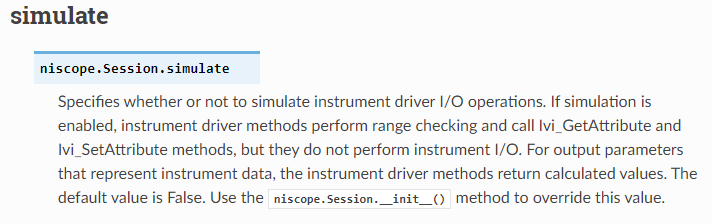
In the NIMI-Python documentation for the 'simulate' attribute, there is not a clear indication of how to use/modify that attribute.
Steps to reproduce issue
- Searched the nimi-python niscope module documentation for information on the 'simulate' property:
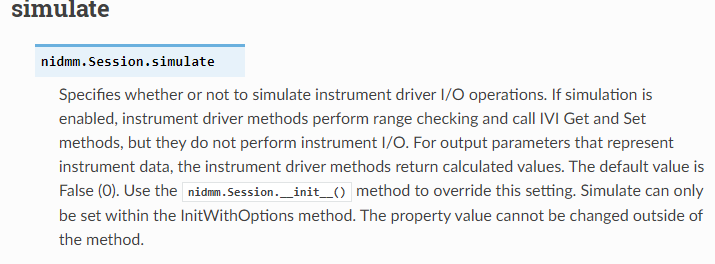
- Searched the nimi-python nidmm module for information on how that module implements the 'simulate' property:
- Looked at the documentation for the 'Session' class for the nimi-python niscope module. This provides information on setting 'simulate' in the options attribute, but unless a customer knew that 'Session' is how nimi-python implements "InitWithOptions" and also that "InitWithOptions" is how 'simulate' is set in LabVIEW/C, the customer would not know to look there based on the niscope documentation for 'simulate'.
I provided the proper syntax to the customer:
with niscope.Session("Dev1", options={‘simulate’:True}) as session:
However, I think there should be a clear conceptual link in the documentation between the 'simulate' property and how that property is modified.
Contributor guide
First steps
- Read the whole issue, then the project's contributing guide.
- Comment on the issue to say you are picking it up — it saves two people doing the same work.
- Fork the repository and make your change on a branch.
- Open a pull request that references the issue number.
Research direction
Start with the nimi-python niscope module documentation for the simulate attribute and compare it with the nidmm documentation and the niscope Session class documentation. Clarify the conceptual link between simulate and the Session options syntax shown in the issue, then verify that a reader can find how to enable simulation from the niscope documentation.
Written by the indexing model from the issue text.
Assessment
- Tech stack
- python
- Domain
- documentation
- Issue type
- Documentation
- Difficulty
- 2/5
- Estimated time
- 1-3 hours
- Activity status
- Stale
- Clarity
- Mostly clear
- Newbie friendliness
- 35/100