nextcloud / nextcloud/whiteboard
Buttons overlapped behind top tool bar on anonymous editable access
Open
Nobody has claimed this yet.
- Dominant language
- JavaScript
- Stars
- 215
- Forks
- 39
- Avg merge
- 1d 3h
- Merged PRs (30d)
- 32
Description
Version: Whiteboard included with Nextcloud AIO v10.11.0
To reproduce:
- Create a whiteboard file
- Create a share link and change permission to "Can edit"
- Use another browser or incognito mode to access such link anonymously.
Be cause of the "Can edit" permission, both the edit too bar and zoom buttons will appear on the top position, overlapping each other.
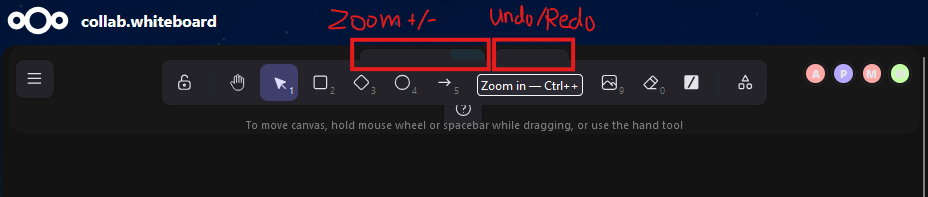
Potential solution:
- When "Can edit" is selected, use the same UI element position as with logged-in users, where the zoom and undo/redo buttons are on the bottom left.
Contributor guide
First steps
- Read the whole issue, then the project's contributing guide.
- Comment on the issue to say you are picking it up — it saves two people doing the same work.
- Fork the repository and make your change on a branch.
- Open a pull request that references the issue number.
Research direction
Reproduce the issue by opening a whiteboard through an anonymous editable share link, using the reported Nextcloud AIO v10.11.0 context. Inspect the toolbar and zoom/undo/redo positioning for this access mode; done means the controls no longer overlap and use the same placement described for logged-in users.
Written by the indexing model from the issue text.
Assessment
- Tech stack
- javascript
- Domain
- frontend
- Issue type
- Bug
- Difficulty
- 3/5
- Estimated time
- 1-2 days
- Activity status
- Stale
- Clarity
- Mostly clear
- Newbie friendliness
- 45/100