Add "join call" button to sidebar (for guests), to make calls easier accessible on mobile devices
Nobody has claimed this yet.
- Dominant language
- PHP
- Stars
- 2.2k
- Forks
- 587
- Avg merge
- 18h 27m
- Merged PRs (30d)
- 333
Description
How to use GitHub
- Please use the 👍 reaction to show that you are interested into the same feature.
- Please don't comment if you have no relevant information to add. It's just extra noise for everyone subscribed to this issue.
- Subscribe to receive notifications on status change and new comments.
Is your feature request related to a problem? Please describe.
One NC instance I am running offers training to people in remote places or conflict areas, where most users only have mobile phones to access the video training. Only teachers have accounts on the cloud, and the (changing) group of attendees join as guests. Some users have reported, that they were "stuck" at the sidebar (i.e. change name area), as it wasn't intuitive/obvious to them, to close the sidebar, in order to be able to see the actual chat and most importantly the "join call" button.
On mobile devices, the sidebar to change the the guest's name, covers most of the screen and hides the "join call" button (see image below).
Also, users for whom there is no translation to their native language or who are analphabetic might find it more accessible if there was a camera symbol (such as in the default "join call" button in the header) right on the first screen they see.
Describe the solution you'd like
I think it would be good if guests in a video chat would have the "join call" button underneath the field to change the name and call settings, so that it would be obvious to find access to the video session right away.
Describe alternatives you've considered
-
Potentially, this feature (the start button in sidebar) could only appear for users of mobile devices or with tiny screens.
-
The close button ("x" top right) could be more visible, or explaining text added (such as "hide settings", "join chat", "join call", etc)
-
Another way to make video sessions for guests (that are not tech savvy)) easier accessible (which goes beyond spreed though), could be to allow guest to join calls on the nextcloud talk android app, without having an account (see issue #https://github.com/nextcloud/talk-android/issues/261#issuecomment-408849050).
Additional context
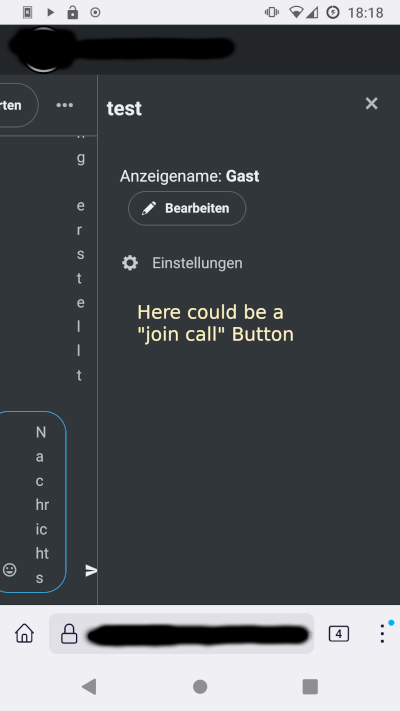
Screenshot of joining a video session as guest on a mobile phone.
Contributor guide
First steps
- Read the whole issue, then the project's contributing guide.
- Comment on the issue to say you are picking it up — it saves two people doing the same work.
- Fork the repository and make your change on a branch.
- Open a pull request that references the issue number.
Research direction
Start by locating the guest video-chat sidebar containing the name and call-settings fields, then compare it with the existing “join call” button in the header. Test the guest flow on a small mobile screen. Done means guests can find a join-call button beneath the name and call settings without first closing the sidebar.
Written by the indexing model from the issue text.
Assessment
- Tech stack
- javascript
- Domain
- frontend, mobile-dev
- Issue type
- Feature
- Difficulty
- 3/5
- Estimated time
- 1-2 days
- Activity status
- Stale
- Clarity
- Mostly clear
- Newbie friendliness
- 45/100